






















👉 Managing Baselines with IBM Doors Next - What do you need to learn?
- Define your baseline strategy →
- Create a baseline →
- Use baselines for impact analysis →
- Avoid the most frequent baseline management issues →
- Prepare for audits →
In IBM DOORS Next, baselines capture the approved state of requirements at specific lifecycle milestones. They intend to preserve the configuration that was reviewed, validated, or authorized before downstream work begins.
A strong baseline strategy, established right from the start, is a foundational governance decision that determines whether your projects can demonstrate compliance, manage change, and support certification activities with confidence.
In this article, we share concrete recommendations for creating and managing baselines effectively in IBM DOORS Next.
🔍 Start here for quick answers
- 👉 I need to define a baseline strategy
- 👉 I need to create a baseline in DOORS Next
- 👉 I need to assess impact between versions
- 👉 I need to prepare for an audit
TABLE OF CONTENTS
What is a Baseline in IBM DOORS Next? (And what it isn't)
Project Context and Prerequisites
How to Define Your Baseline Strategy?
How to Create and Handle Baselines in IBM DOORS Next?
How to Maintain Configuration-Aware Traceability in Safety-Critical Projects?
How to Use Baselines for Impact Analysis?
How to Avoid Baseline Sprawl and Governance Gaps?
What Are the Typical Audit Questions About Baseline Management?
What is a Baseline in IBM DOORS Next? (And what it isn't)
In IBM DOORS Next, a baseline can be defined as a read-only configuration created from a stream at a specific point in time.
When a baseline is created, it freezes the exact state of a component as it was in the active stream. It includes the specific versions of a requirement, their attributes, and their relationships in place at the time.
The baseline can then be:
- Used as a milestone reference
- Compared with another set of baselines or streams
- Used as a starting point for a new stream
- Referenced in audits and certification activities
- Used as a stable reference for reviews and validation activities
- Used to anchor traceability at a specific point in the lifecycle
Baselines are created at the component level, which implies that they do not apply to a single isolated module. This is an important consideration to highlight, especially for teams attempting to restore just a part of a project to a previous state.
|
ℹ️ Please note that a stream is modifiable, whereas a baseline is not. It implies that artifacts cannot be modified, and changes such as view updates cannot be saved within that configuration. Unlike a stream, a baseline is not used to create or edit requirements, but to preserve an approved state of the system at a given point. |
In safety-critical systems, baselines serve as formal approval and compliance anchors. They provide a controlled reference of the requirements configuration that was authorized at a specific stage of the lifecycle. So, a well-defined baseline strategy for IBM DOORS Next is essential.
Project Context and Prerequisites
Before digging into the baseline management strategy, we wanted to make some clarifications. In this article, we assume that your IBM DOORS Next project uses configuration management, which means that you work with:
- Components
- Streams
- Baselines
- Change sets

In this model, baselines are configuration objects built from streams. They retain specific versions of artifacts and can be compared, branched, and reused in a controlled manner.
If configuration management is not enabled in your project, note that baseline behavior
and capabilities will differ. In this article, we assume that configuration management is enabled in DOORS Next.

How to Define Your Baseline Strategy?
You need to determine when the baselines should exist and why. Indeed, in safety-critical projects, baselines should align with lifecycle decisions. They must indicate the points where requirements have been reviewed, evaluated, and approved for downstream work.
You don’t want to create baselines ad hoc. If baselines are created randomly, they quickly lose their meaning. So instead, you need to tie them to governance checkpoints that already exist in your process.
Common triggers include:
- System Requirements Review
- Preliminary Design Review
- Critical Design Review
- Test Readiness Review
- Release freeze
- Major change approval window
Each baseline should correspond to a specific decision point and clearly identify the exact set of requirements that were approved at that stage of the lifecycle.
Once baselines are tied to lifecycle milestones, they become part of your configuration management discipline and can support traceability, impact analysis, and audit readiness.
Create clear Naming Conventions
When baselines are not named with well-defined rules, teams usually lose track of their objectives and start creating unnecessary ones. That’s how projects accumulate too many baselines.
So, you must avoid unclear labels such as: Baseline 1; Final; Updated version, etc.
There is no imposed naming convention for baselines, but IBM DOORS Next allows you to define a version number, a name, and a description. Defining consistent naming rules will help you quickly understand the purpose of each baseline. A typical approach is to include:
- The scope (for instance, requirements of subsystems’ names)
- The milestone or the lifecycle stage
- The release or version
- The date
For example, it could look like these structures:
- REQ_SRR_2026-03-15
- REQ_PDR_2026-06-01
- REQ_RELEASE_1.0_2026-11-10
Or you can use a description like the one shown in the illustration below. (See Fig. 1)
In the baseline description, you should also record key elements of context, such as the scope of the baseline, the review or milestone it represents, and a reference to related change requests or review records. (See Fig. 3)
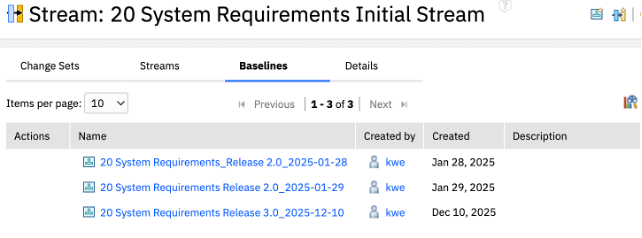
Fig. 1 – Baseline description
| ℹ️ A good practice consists of keeping a simple baseline register listing the baseline name, date, owner, and related review records. Clear identifiers make reviews and audits much easier. |
Once the baseline strategy is established, we’ll see how baselines are used operationally in IBM DOORS Next.
How to Create and Handle Baselines in IBM DOORS Next?
In practice, teams perform two closely related operations. First, they need to create a baseline to freeze the state of requirements at a specific moment. This applies when entering a critical phase, such as system validation testing or regulatory compliance. Establishing a baseline at this stage ensures that requirements remain unchanged and provides a reference point for future comparisons and validations.
Then, when new work starts in that approved state, they need to create a stream from a baseline.
Procedure 1 – Create a Baseline from a Stream
The objective of this procedure is to capture a stable snapshot in the current stream.
- Open the Current Configuration menu and choose the stream you need
- Select Create Baseline (Fig. 2)
- Fill in the version number, baseline name, and description according to your naming convention
(See Fig.3) - Confirm
This baseline is now available as a read-only reference configuration that can be used for comparison, review, or future development.
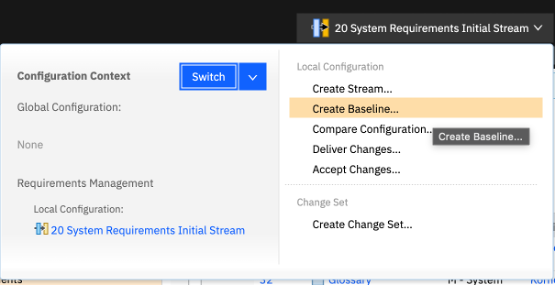
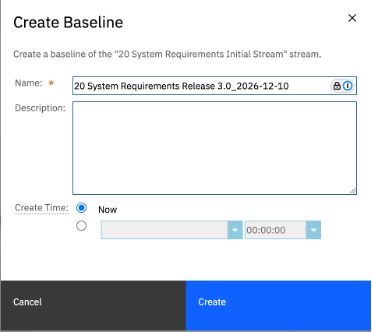
Fig. 2&3 – Create a Baseline from a Stream
Procedure 2 – Create a Stream from a Baseline
Now that your baseline exists, you can also use it as the starting point of new development. This operation is typically used when teams begin work on a new release, variant, or controlled change
- Open the Current Configuration menu and choose the baseline you need (Fig. 4)
- Select Create Stream from Baseline (Fig. 5)
- Provide a clear stream name and initialize the stream (Fig. 6)
- Confirm
Your new stream is now available as a working configuration. Teams can pursue development while the original baseline remains unchanged.
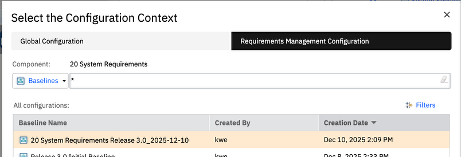
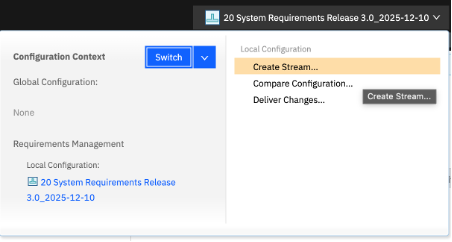
Fig. 4&5 –Create a Stream from a Baseline
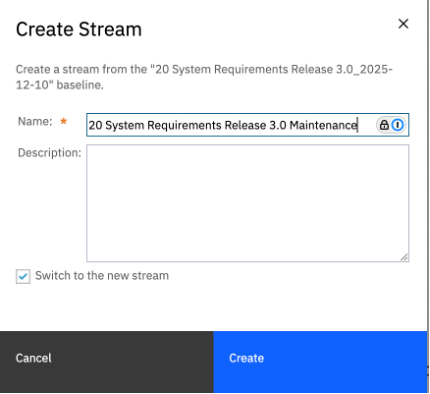
Fig. 6 – Create a Stream from a Baseline (Add a description)
How to Maintain Configuration-Aware Traceability in Safety-Critical Projects?
Baselines freeze a specific version of requirements. However, in safety-critical projects, requirements are only one part of a broader engineering lifecycle. For traceability to remain reliable, all linked artifacts must refer to the same configuration state. Otherwise, traceability links may connect artifacts that belong to different versions of the system.
When working with a single DOORS Next component and configuration context, baselines can provide this reference point. They anchor the exact version of requirements used for reviews, testing, or release preparation. However, when traceability crosses components or extends to other lifecycle tools, teams must work in a Global Configuration context to ensure that links resolve to the correct artifact versions.
Extending Configuration Control Across Lifecycle Tools
Global Configuration provides the context for resolving links between versioned artifacts across components and lifecycle tools. It allows teams to assemble a system-level configuration from aligned contributions in multiple IBM Engineering Lifecycle Management tools1.
The resulting configuration represents a consistent snapshot of the entire engineering context. In practice, these configurations may combine artifacts produced at different points in time across engineering domains, while still representing a consistent system version.
Creating a Release Audit Configuration in Global Configuration
When teams use Global Configuration to align configurations across lifecycle tools, they can create a dedicated configuration that represents the approved state of the system. This configuration serves as a reference point for:
- Certification evidence
- Audit reviews
- Configuration-aware traceability across the lifecycle
In IBM ELM, Global Configuration manages contributions from each lifecycle application to ensure configuration consistency across tools.
Here’s the procedure to create it:
- Open the Global Configuration application
- Create a new Global Configuration stream or configuration
- Add the approved RM baseline containing the validated requirements (See Fig. 3)
- Add the corresponding QM configuration or test plan snapshot
- Add the relevant CCM stream or baseline containing the approved change requests
- Add the architecture baselines if system models are part of the lifecycle
- Save the configuration and identify it as the official release configuration (See Fig. 8)
1Most safety-critical environments rely on multiple lifecycle tools within IBM Engineering Lifecycle Management, including: Requirements Management (RM), Quality Management (QM), Change and Configuration Management (CCM), Architecture Management (AM), etc.
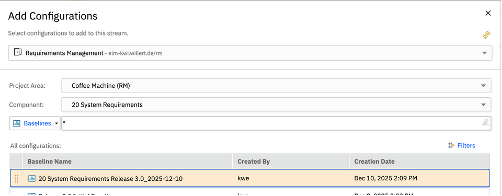
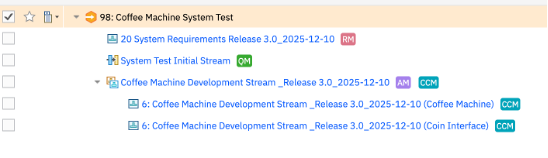
Fig. 7&8 – Add Configurations
| ℹ️ In regulated environments under ISO 26262 or DO-178C, configuration management must ensure that lifecycle evidence can be traced back to a clearly identified and approved system configuration. Therefore, cross-domain configuration alignment is essential to demonstrate consistency between requirements, design, implementation, and verification activities. |
➡️ Contact us if you have questions about Global Configuration Management
How to Use Baselines for Impact Analysis?
Baselines provide a stable reference that allows teams to analyze how requirements evolve over time.
In safety-critical projects, each approved change has to be assessed before implementation. Teams need to determine which requirements were modified, which downstream artifacts may be affected, and if additional verification activities are requested.
Baseline comparisons make this analysis possible. They allow teams to identify differences between a working stream and a milestone baseline, or between two baselines representing different lifecycle stages
These comparisons help determine the scope of changes and support impact analysis.
Procedure 1 – Compare a stream to a baseline
This specific comparison helps identify changes introduced since the last approved milestone.
- Select the stream in the Current Configuration menu
- Choose Compare Configurations
- Select the baseline as the comparison target
- Review the differences between artifacts
- If necessary, export the comparison report
The result will help you determine:
- Which requirements have changed
- Whether safety classifications were modified,
- Which test cases must be re-executed
- Whether the safety analysis must be updated.
Procedure 2 – Compare two baselines
This comparison is typically used for reviewing the progression of requirements between lifecycle milestones.
- Select the first baseline
- Select Compare Configurations (Fig.9)
- Choose the second baseline
- Review the differences across artifacts (Fig. 10)
- You can create a report as well
Comparison should then be stored with change control records to support traceability and audit evidence.
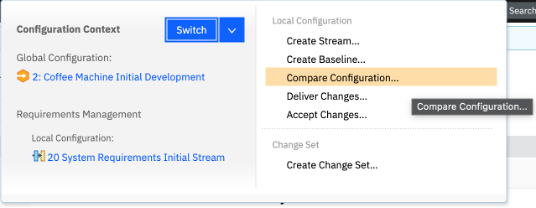
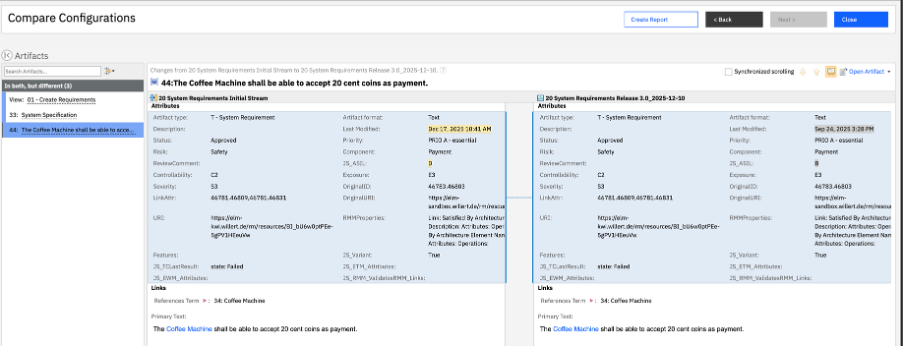
Fig. 9&10 – Compare two baselines
How to Avoid Baseline Sprawl and Governance Gaps?
Baseline management is a process that needs to remain disciplined. If you create baselines without having set clear governance rules, your projects will accumulate too many configurations that will be difficult to interpret or maintain. Sometimes, you don’t even know why you created them in the first place. It’s generally a sign that they weren’t necessary.
The most frequent baseline management issues include:
- Creating baselines at a random pace and without a clear purpose
- Inconsistent or unclear naming conventions
- No designated owner is responsible for baseline creation
- Archiving or classifying obsolete baselines
To avoid these issues and their unfortunate consequences, organizations should agree on simple but sustainable governance rules and controls.
Here are a few examples that you can easily put into practice:
- Define explicit baseline gates tied to governance checkpoints (design reviews, release freeze, major change approvals, etc.) and enforce them. For instance, baselines created outside these gates should require documented justification.
- Assign clear ownership and responsibility roles for baseline creation and maintenance. For instance, you may want to do this at the component or subsystem level, so that responsibility for configuration decisions is not ambiguous.
- Preserve official release baselines as long-term reference configurations, since they represent the approved state of requirements used for certification, verification, or delivery.
- Maintain lifecycle status for older baselines. For example, you can mark them as superseded by newer configurations, or you can archive them according to project retention policies.
What Are the Typical Audit Questions About Baselines Management?
A well-governed and strong baseline strategy is your number one asset when reviewers examine your configuration management practice. The following questions reflect what auditors and certification bodies most commonly ask teams working under standards such as ISO 26262 or DO-178C.
Which requirements baseline was used for system verification?
Auditors often ask teams to identify the exact requirements of the configuration used during verification activities. The objective is to confirm that testing and validation were performed against a clearly defined set of requirements. Teams must then be able to show the baseline identifier and demonstrate that test evidence corresponds to that configuration.
How to show this on IBM DOORS Next?
- Open the Configuration Context (Current Configuration) menu
- Choose the baseline corresponding to the review or the release
- Confirm that the active configuration context is set
- Open the relevant requirements module or artifact view
With this procedure, you can demonstrate the exact baseline identifier, the date and milestone recorded in the baseline description, and the requirements included in that configuration.
|
ℹ️ One common mistake in safety-critical environments consists of reviewing artifacts in one configuration and exporting evidence from another. So, a good practice is to always confirm the active configuration before comparing, reviewing, or exporting. |
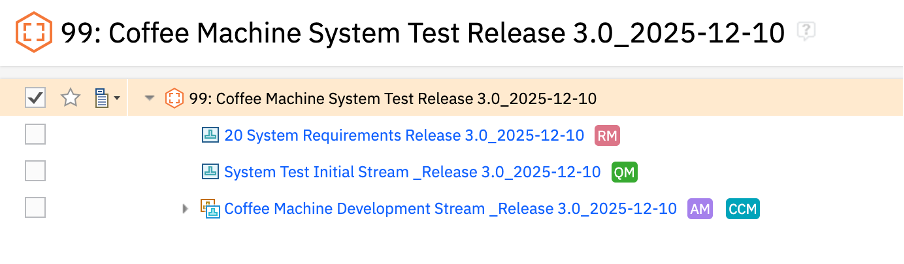
Fig. 11 – Demonstrate an exact baseline identifier
What changes occurred between the previous review baseline and the current one?
Certification reviews frequently involve comparing two milestone baselines. Auditors want to understand how the requirements evolved over lifecycle stages and if the associated changes were reviewed and approved. Teams must be able to demonstrate the differences and explain the rationale for those modifications.
How to show this on IBM DOORS Next?
Follow the baseline comparison procedure explained in the Impact Analysis section above. Once the comparison is generated, export the difference report as audit evidence.
This output allows you to present in a certification review the modified requirements, newly added or deleted artifacts, and the attribute-level changes.
How do you ensure that traceability links reference the correct version of requirements?
Auditors typically verify that traceability relationships remain consistent with the configuration used for development and verification. They may ask teams to show that requirements, tests, and change records belong to the same configuration context. This ensures that lifecycle evidence corresponds to the correct system version.
How to show this on IBM DOORS Next?
- Open the baseline configuration used for the milestone
- Choose a requirement artifact
- You can visualize its traceability links in the sidebar or in the link explorer
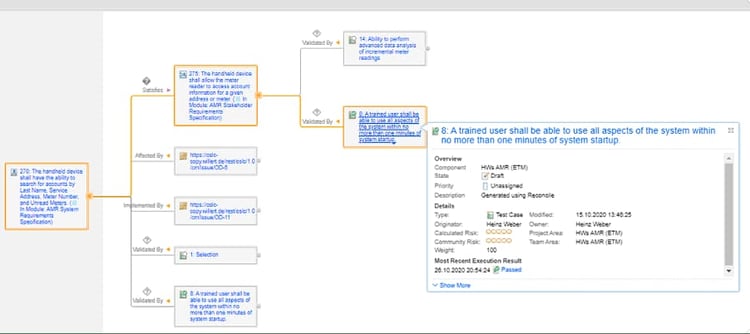
Fig. 12 – Link Explorer in IBM DOORS Next
Note that since the configuration context is set to baseline, the links display the artifact versions that existed in this configuration. And if Global Configuration is used, auditors can also see that requirements, tests, and change records are aligned within the same system-level configuration.
➡️ Contact our team if you need more information or training on baseline management, configuration strategies, and configuration-aware traceability in IBM DOORS Next.

Finale Thoughts
No more doubt about it, baseline management is a core engineering mechanism and not just a configuration afterthought. Indeed, when baselines are tied to real lifecycle decisions, named with consistency, and integrated with configuration-aware traceability across the entire toolchain, they become reliable and trustworthy evidence anchors for both engineering teams and auditors. Certification reviews are less stressful when every approved state is documented, traceable, and reproducible.
In this context, IBM DOORS Next provides the required infrastructure to formalize this discipline at scale: approval points become explicit, parallel developments remain controlled, and consistency across complex and multi-stakeholder environments is truly maintainable.
➡️ If you want to go further, our IBM DOORS Next training guides teams from document-centric to repository-based requirements management.
➡️ It combines theory with hands-on exercises on traceability, impact analysis, configuration management, and many more topics in a real project context.



Leave us your comment