Jira and IBM Engineering Test Management integration

OSLC Connect for Jira Cloud links Jira issues to IBM ETM test cases, scripts, and results with live, bi-directional links, and built on the open OSLC standard. No data copies, no sync jobs.

Available for Jira Data Center and Jira Cloud.

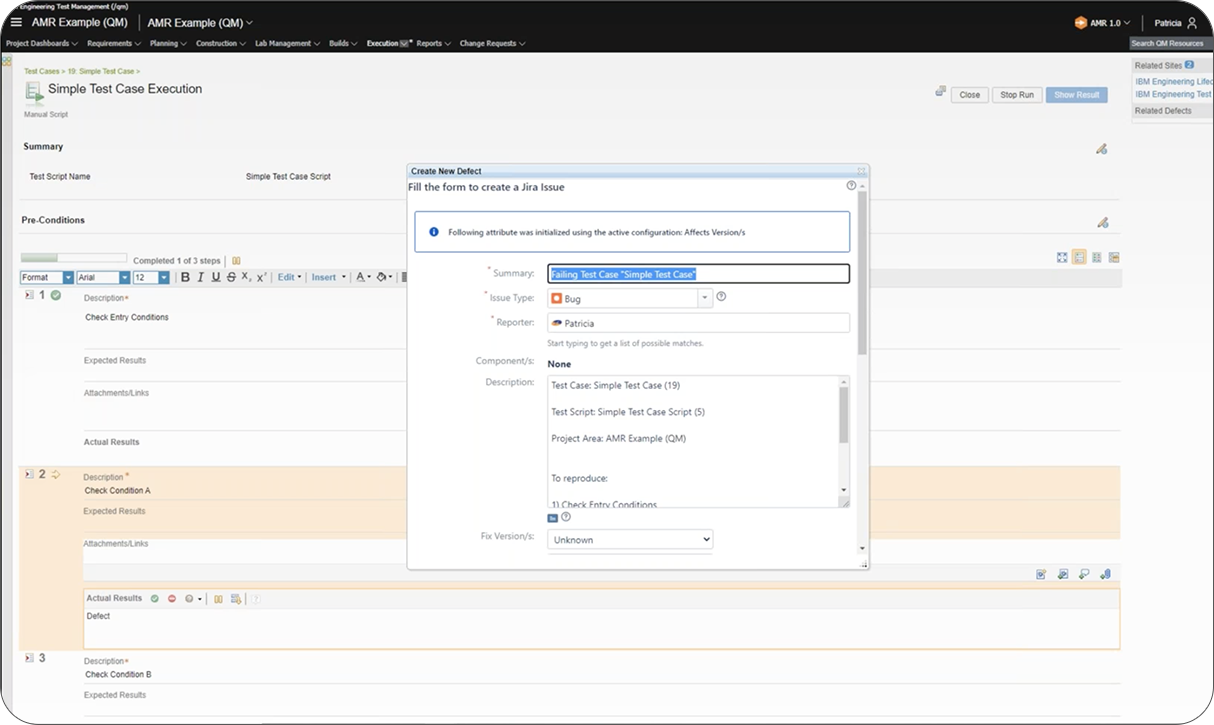
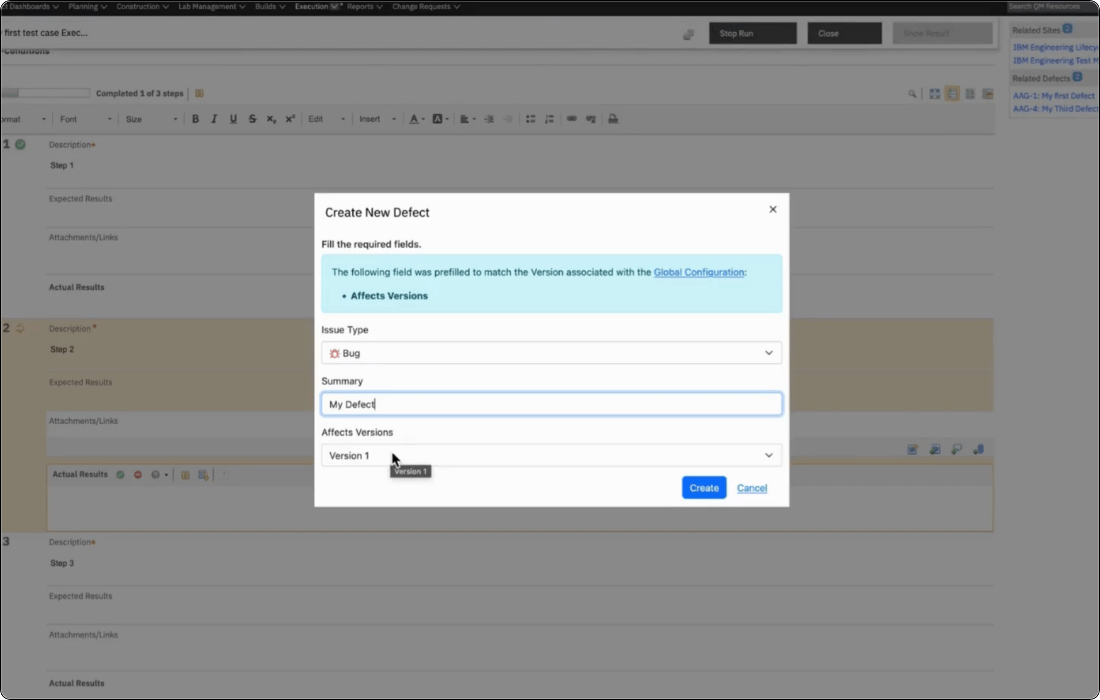
Create new Jira defect_Jira IBM ETM integration_OSLC Connect for Jira_SodiusWillert_1
OVERVIEW

About our Jira + IBM ETM OSLC-based integration

In regulated engineering programs, test management and defect tracking rarely live in the same tool. Test engineers work in specialized Test Management tools such as IBM Engineering Test Management (ETM); development teams track issues in Jira. Without a live connection between the two, a failed test case generates a manual handoff where someone copies a defect ID, someone else creates a Jira issue, and the link between test evidence and the fix exists only in email or a spreadsheet.

OSLC Connect for Jira eliminates that handoff. By connecting IBM ETM and Jira, it enables the creation of live, bi-directional links where test engineers log defects directly from ETM into Jira, developers see the linked test case from within their Jira issue, and IBM Report Builder can report on the full chain from requirement to test result to Jira fix. No data copies, no manual extraction, no traceability gaps before an audit.

Linking_data_SodiusWillert_76x76px_color

Live Links, not copies

Test cases and results stay in IBM ETM. Defects stay in Jira. OSLC Connect creates a live reference between them, so both tools always reflect the current state. No synchronization engine, no reconciliation job, no stale data.

oslc-logo

Standards-based integration

The integration is built on the OSLC specification, the same open standard used across IBM ELM, Siemens Polarion, and PTC Windchill. Links don't depend on a single vendor's roadmap, so they keep working as Jira and ETM both evolve independently.

Safety-icon_SodiusWillert_100x100px_color

Built for Regulated Engineering

Global Configuration support keeps traceability accurate across product variants and baselines, a requirement in automotive ASPICE and A&D DO-178C/DO-254 environments.

KEY INTEGRATION CAPABILITIES

Jira Software + IBM Engineering Test Management integration capabilities

From a failed test step in ETM to a resolved defect in Jira, OSLC Connect for Jira Cloud keeps test and development teams working in their own tools while staying fully linked.

Create Jira defects from IBM ETM test cases

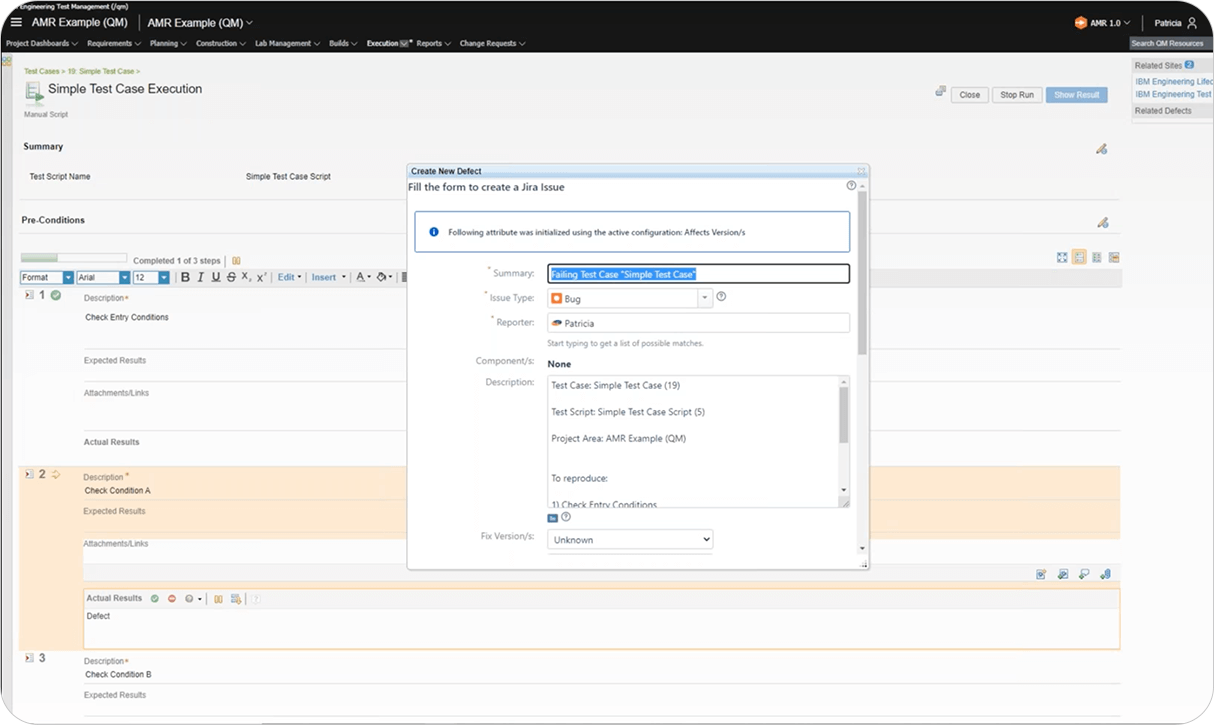
When a test case execution fails in IBM ETM, test engineers can create a new Jira defect without leaving ETM. OSLC Connect for Jira opens a native Jira creation form directly inside ETM, pre-populated with the test case context.

The new defect is created in Jira and the link back to the ETM test case is established in the same action. no manual copy-paste, no separate Jira session required.

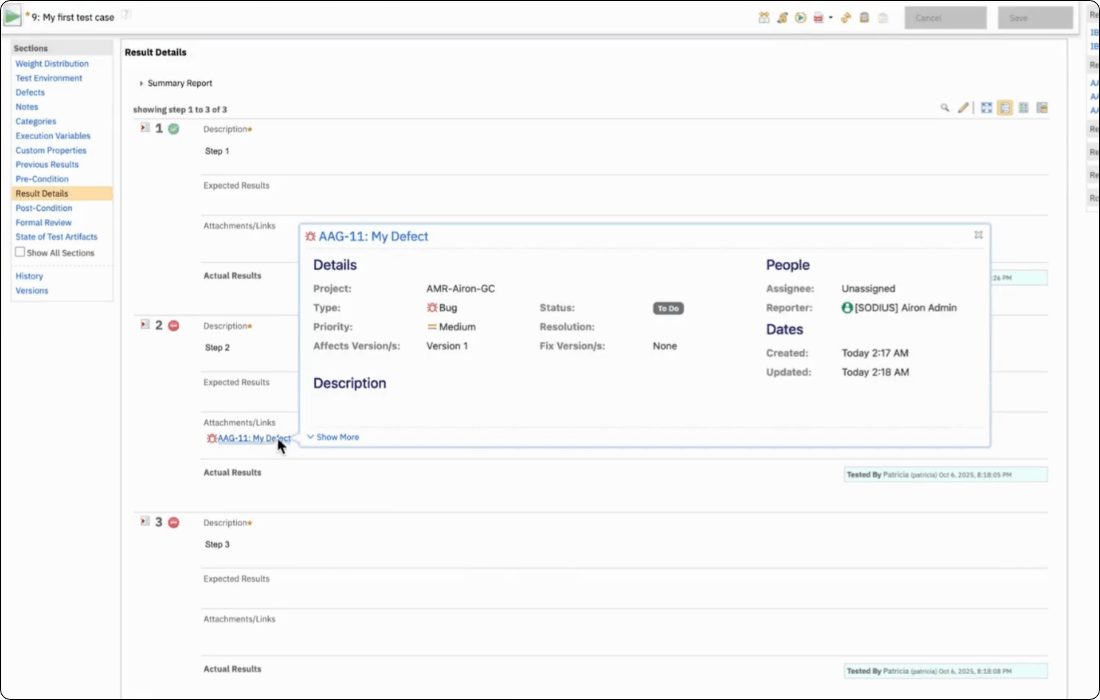
Preview Jira data in IBM ETM

Once a link exists, hovering over the linked Jira item from within ETM shows a rich preview: its current status, assignee, and description, pulled live from Jira Cloud at the moment of the hover rather than a cached snapshot.

A test engineer can confirm whether a defect has been picked up, is in progress, or has already been resolved without leaving ETM or waiting on a status update from the development team.

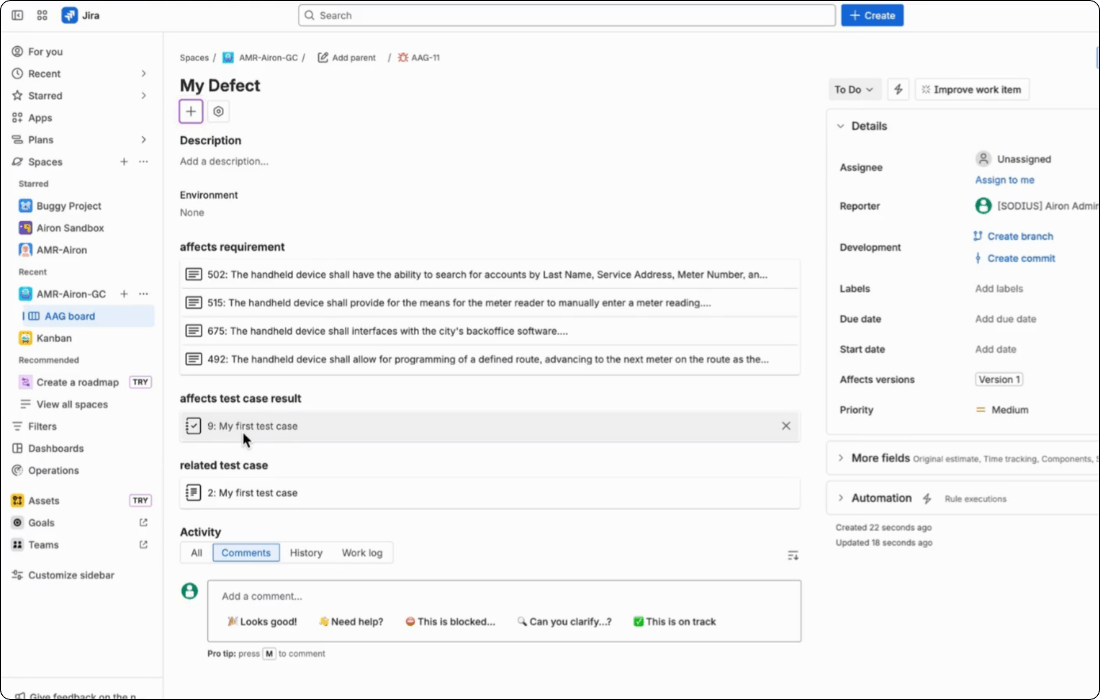
See OSLC Links inline on any Jira issue

Jira issues show the type and reference of each linked ETM artifact directly on the item, using a simplified, decorator-based view rather than heavy rich hovers.

Developers can see what a test case is at a glance, in the Jira interface they already use, without being pulled into an engagement they didn't ask for. 

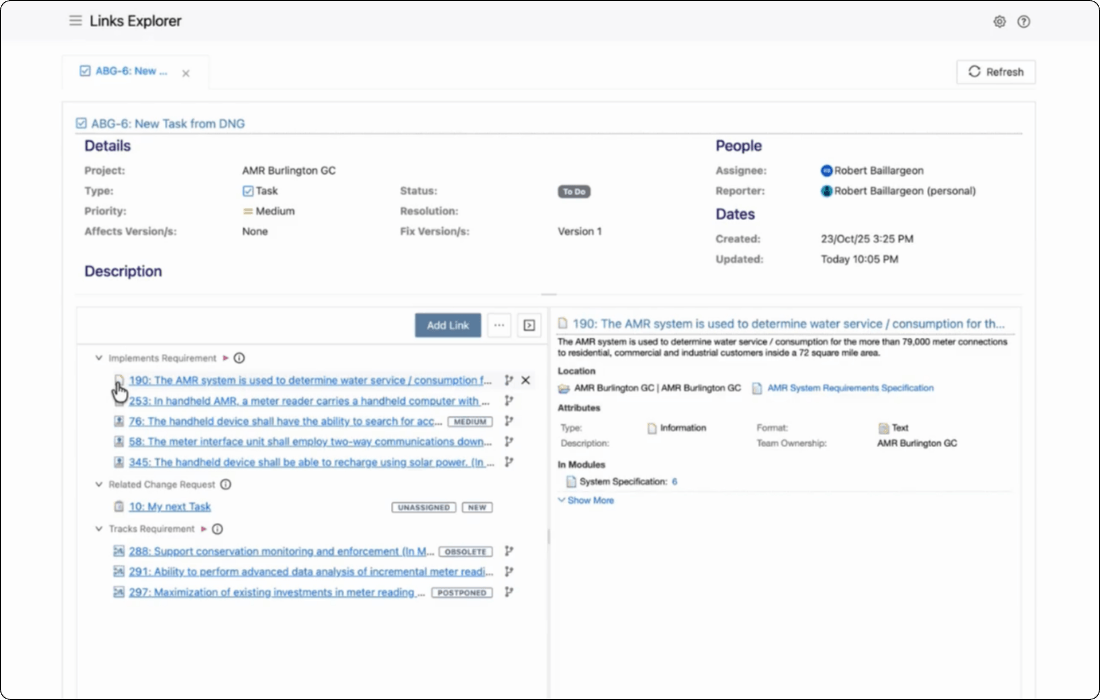
Explore and manage Links from the Link Explorer

When a developer in Jira wants to engage further, the Link Explorer surfaces rich previews, sorting and filtering by domain, and both dialog-based and drag-and-drop link creation to ETM artifacts.

Depth is available on demand. Teams get a simple default view and a full-featured workspace whenever they need it.

Fix Versions mapped to Global Configurations

OSLC Connect for Jira supports IBM Global Configuration.

Map Jira fix versions to IBM Global Configurations, so links to test cases and results resolve against the correct baseline for each product variant.

Teams managing multiple product variants get traceability that's accurate per configuration, not just per project.

IBM Report Builder with Jira defect data

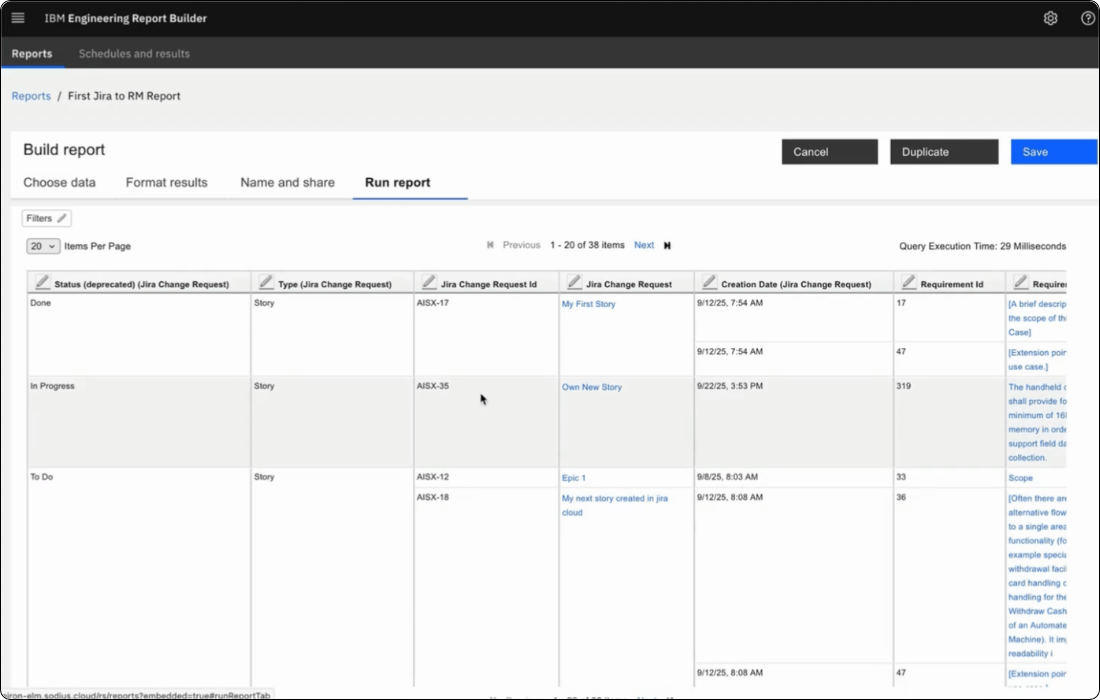
OSLC Connect for Jira exposes Jira artifacts and their attributes into IBM Report Builder and the Lifecycle Query Engine (LQE).

When DOORS Next is also connected to the same Jira instance, engineering managers can build a single cross-tool compliance report showing the complete traceability chain including DOORS Next requirement, Jira story, IBM ETM test case, test result, linked Jira defect (with status).

For ISO 26262, ASPICE, and DO-178C, this is the audit evidence chain. Data remains always current, and it is never assembled by hand.

BENEFITS

Why teams choose OSLC Connect for Jira Cloud

Closing the gap between test management and development isn't just a convenience. In regulated programs, it's the difference between audit-ready evidence and a scramble before a review.

Check mark_color_59x59px
Close the Traceability Loop

Requirements, test cases, test results, and Jira defects connect end to end. There is no more gaps between what was tested and what was fixed.

Check mark_color_59x59px
No Data duplication

A federated architecture means test data stays in ETM and defect data stays in Jira. Both sides are always current.

Check mark_color_59x59px
Built on an Open Standard

OSLC links aren't tied to one vendor's release cycle. They keep working as Jira Cloud and IBM ETM each evolve on their own timelines.

Check mark_color_59x59px
Compliance-ready reporting

Live, queryable traceability supports ISO 26262 and ASPICE evidence in automotive, and DO-178C/DO-254 evidence in aerospace and defense.

Check mark_color_59x59px
Fits the workflow teams already use

Development teams work entirely inside Jira; test teams work entirely inside ETM. Neither has to learn the other tool to stay connected.

HOW IT WORKS

How the Jira and IBM ETM integration works

OSLC Connect for Jira Cloud runs as three connected components: a Forge app inside Jira Cloud, an OAuth 2.0 integration, and a broker deployed in your network that speaks OSLC to IBM ETM. Here's what that means day to day.

Deploy the Broker

Install the OSLC Connect Forge app from the Atlassian Marketplace and deploy the lightweight Broker (a Tomcat web application with a small PostgreSQL database) with network access to Jira Cloud and your OSLC-compliant engineering tools. Contact us to get access to the Broker.

Configure the connection

Authenticate Jira Cloud and IBM ETM through OAuth 2.0, then configure which projects, domains, and Global Configurations participate in the integration.

Link, trace, and report

Create links between Jira issues and existing ETM test cases or create new ones. Every link is stored as a standard OSLC reference, visible and navigable from either tool the moment it's created.

Pricing calculator

Estimate the cost of your future OSLC connector for Jira.

Use our calculator to configure a cost estimate that fits your unique business needs.

  1. 1
    Team size:
    Jira users
  2. 2
    Select your hosting platform:
  3. 3
    Do you need advanced features for Reporting and Global Configuration in IBM ELM?

OSLC Connect for Jira pricing estimate

Our app is sold as an annual subscription. You are eligible for support and automatic version updates as long as your subscription is active.

Your estimate:

  • OSLC Connect for Jira pricing estimate

    Cloud, annual subscription

    $- USD / year

    for - Jira users

  • TRS/GC option for IBM ELM

    Cloud, annual subscription

    $- USD / year

    for - Jira users

Total estimated cost:

$- USD / year

for - Jira users

SUPPORT AND RESOURCES

Everything you need to get up and running

Explore all our resources to learn how to integration Jira Software with IBM Engineering Test Management.

FAQ

Jira + IBM ETM Integration Frequently Asked Questions

Common questions about how the integration works, what it costs, and how to get started.

Is there a free trial available?

Yes. We provide a 30-day evaluation license and support to help you deploy OSLC Connect for Jira Cloud in a sandbox environment and test your specific use cases with your own data. Request a trial from the Atlassian Marketplace ↗ or contact our team directly via our contact form.

Does the integration copy test case data into Jira?
No. OSLC Connect for Jira uses a federated architecture: test cases and test results remain in IBM ETM, defects remain in Jira. The integration provides live linked previews and bi-directional navigation. No data is duplicated or synchronized between the two tools.
Can test engineers create Jira defects without a Jira account?

Test engineers initiate Jira defect creation from within IBM ETM using OSLC Connect for Jira's embedded creation form. The Jira defect is created using authenticated access. Test engineers will need Jira credentials to create or link issues. Administrators configure which Jira projects and issue types are accessible from within ETM.

What IBM ETM artifact types can be linked from Jira?

OSLC Connect for Jira supports linking to IBM ETM test cases, test scripts, test plans, and test results. Available link types and artifact types are configurable by a Jira administrator per issue type scheme. Development teams can be limited to the ETM artifact types relevant to their workflow.

Does the integration support Global Configurations for ETM?

Yes. OSLC Connect for Jira supports IBM Global Configurations for ETM, following the same approach as the DOORS Next integration. Jira fix versions can be mapped to OSLC Global Configurations so that test case and test result links resolve against the correct baseline for each configuration context.

Can we report on Jira defects and ETM test results together in IBM Report Builder?

Yes. OSLC Connect for Jira exposes Jira artifacts into IBM's LQE and Report Builder infrastructure. Engineering managers can build cross-tool reports showing ETM test results alongside linked Jira defect status. And when DOORS Next is also connected, the full requirements-to-test-to-defect chain can be reported in a single view. This is the core compliance reporting use case for ISO 26262, ASPICE, and DO-178C.

How much does OSLC Connect for Jira cost?

Pricing is based on Jira user tiers and is available on the Atlassian Marketplace listing. Use the pricing calculator on this page for an estimate, or contact us for a quote.

Ready to connect Jira and IBM Engineering Test Management?

Close the traceability loop between your test management and development teams. OSLC Connect for Jira connects IBM ETM and Jira with live, standards-based links.

Fichier 1 1 1