









Yes. OSLC Connect for Jira can be downloaded and tried for free for 30 days directly through the Atlassian Marketplace. Click here to get the app.
Convert SPARX Enterprise Architect models into Cameo Systems Modeler (MagicDraw) models
Convert IBM Rhapsody models into Cameo Systems Modeler (MagicDraw) models
Convert Cameo Systems Modeler (MagicDraw) models into IBM Rhapsody models
Convert IBM Rational Software Architect models into Cameo Systems Modeler (MagicDraw) models
Convert UNICOM System Architect models into Cameo Systems Modeler (MagicDraw) models
Model-based model-to-model transformation in Rhapsody
Connect ReqIF Compatible Requirements data to your Modeling Environment
Publish engineering data from multiple tools into a unified web platform
Unlock the benefits of UML modeling for Software Development
Leverage the full scope of UML for Model-Based Development of Embedded Systems
Simplify UML-based development of certification-ready source code
Manage models, configurations, and traceability in a unified web platform
Improve IBM Rhapsody productivity through AI-assisted model creation and refinement
UML-based Software Development for AUTOSAR Classic Platform
A graphic modeling environment that simplifies creating, editing, and maintaining profiles
Reduce manual work with powerful automation helpers for IBM Rhapsody
Facilitate compliance with standards and security requirements
Boost the value of IBM DOORS Next with Requirements Management Widgets
Edit, compile, execute, and debug scripts with DXL Editor Pro
Connect your development and systems engineering teams with live, bi-directional requirements traceability. Powered by OSLC Connect for Jira.
In regulated engineering programs such as oin automotive, aerospace, defense, medical devices, requirements live in IBM DOORS Next and development work lives in Jira. Two tools, two teams, and a traceability gap that engineers fill manually: copying requirement into Jira descriptions, exporting spreadsheets before reviews, or waiting for someone to pick up a change.
OSLC Connect for Jira eliminates that gap. It connects IBM DOORS Next and Jira Software and uses the using the OSLC open standard to enable live, bi-directional links, so data stays authoritative in its source tool and both teams see it in real time. No data migration, no synchronisation, no duplication. Requirements stay in DOORS Next. Issues stay in Jira. Everyone works in the tool they already use.
OSLC Connect for Jira uses the OSLC (Open Services for Lifecycle Collaboration) open standard to enable teams to create secure, live references between Jira issues and IBM DOORS Next requirements. When users link a Jira story to a DOORS Next requirement, OSLC Connect for Jira does not copy the requirement into Jira. It creates a live link between the two artifacts. The requirement stays in DOORS Next, owned by the systems engineering team. The Jira issue stays in Jira, owned by the software team. Both sides see each other's data in real time.
Authentication between the two tools is handled server-to-server via OAuth. No data is routed through SodiusWillert servers. Jira administrators control which DOORS Next projects are accessible and which link types are available per Jira issue type. All links and configuration are stored natively inside Jira.
Once connected, the integration runs passively. There are no synchronization jobs to monitor, no scheduled exports to maintain, and no risk of two copies of a requirement diverging.
OSLC Connect for Jira creates a live reference to the requirement in DOORS Next, not a copy of it. Requirements stay in DOORS Next, issues stay in Jira, and both sides reflect changes in real time. No synchronization jobs, no divergence risk, no stale data.
OSLC Connect for Jira installs directly from the Atlassian Marketplace and runs entirely within your Jira Data Center environment. All communication between Jira and DOORS Next is direct, server-to-server, over your existing network. There is no relay server, no SodiusWillert infrastructure in the data path, and nothing new to provision outside of Jira.
Every OSLC link is stored natively in Jira's own data model, not in a separate database. Links survive upgrades and migrations alongside your Jira data, appear in Jira audit logs, and work with tools like ScriptRunner for cross-project searches. No external data dependency.
Bridge the gap between development teams in Jira and IBM DOORS Next with OSLC Connect for Jira. Enable cross-domain collaboration, traceability, and visibility across applications. Some of the features of OSLC Connect for Jira include:
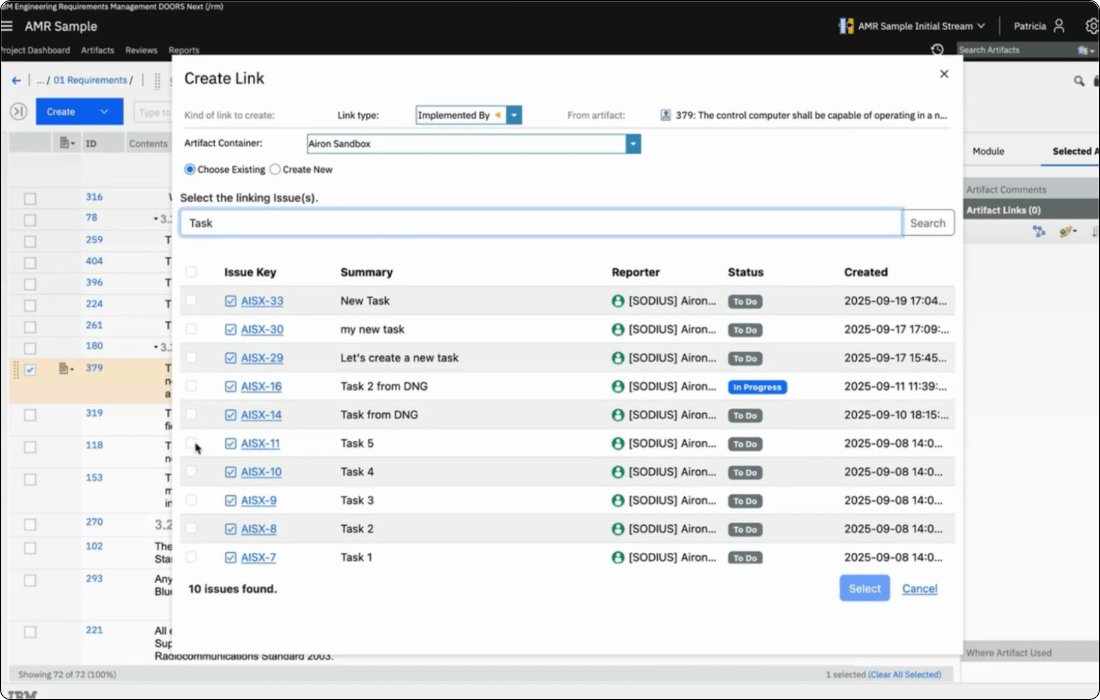
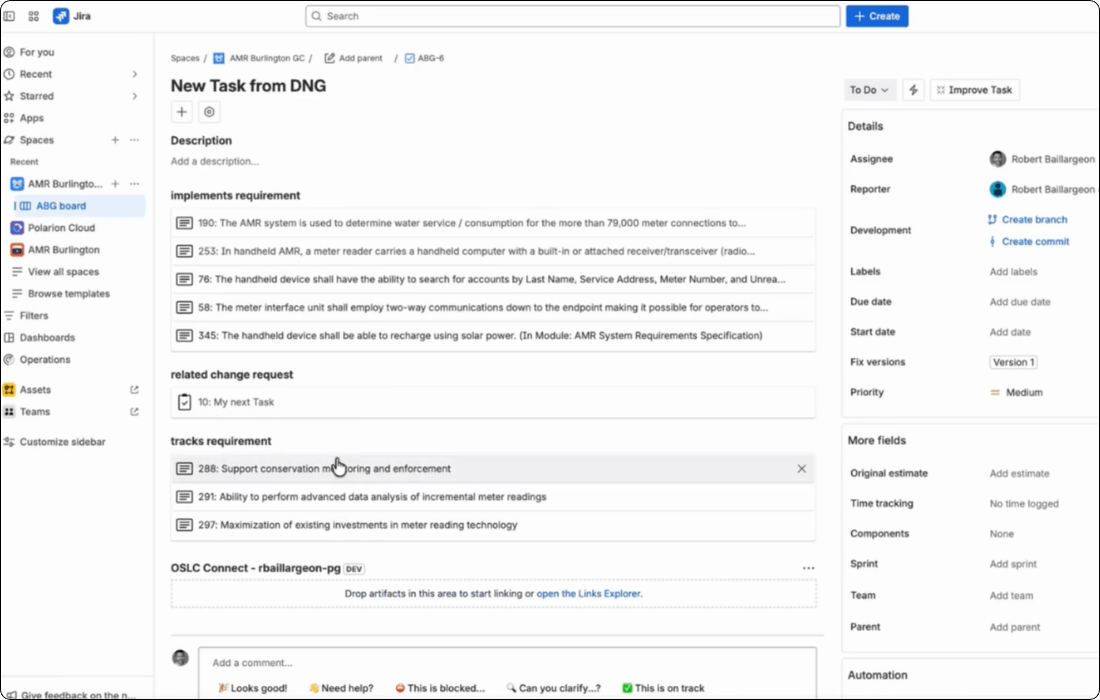
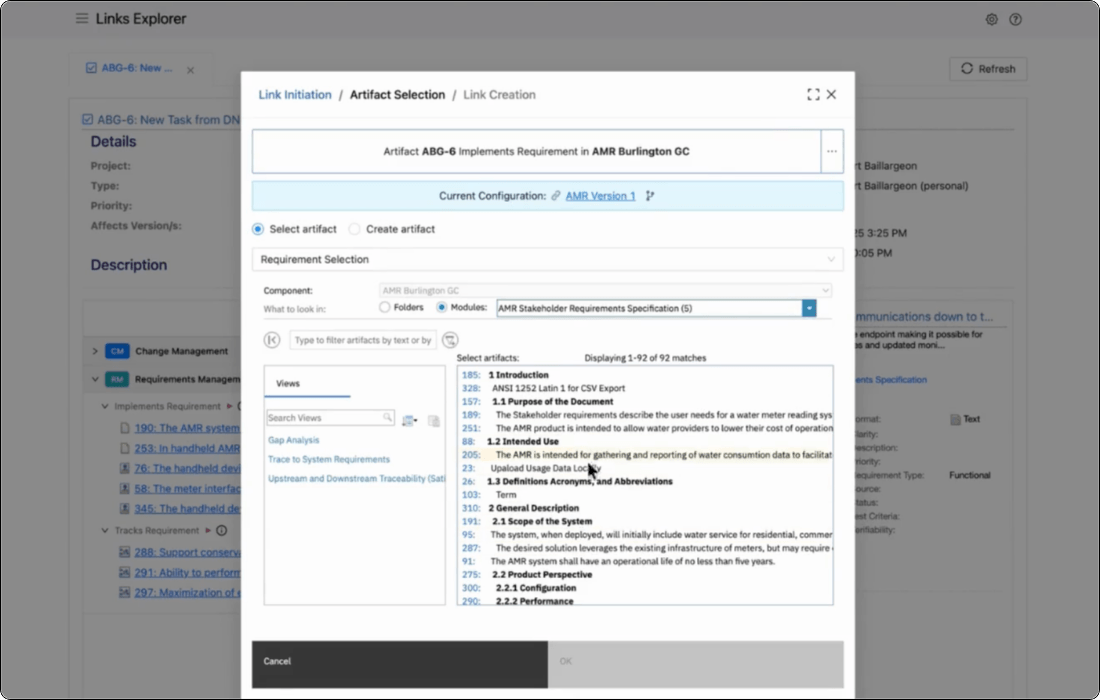
From any Jira issue, select the requirement you want to link. The link is created instantly in both tools simultaneously.
Links can also be created by drag and drop: pull a requirement directly from a DOORS Next panel into the Jira issue view. For teams working through backlog refinement sessions, this makes linking fast enough to do during the meeting.
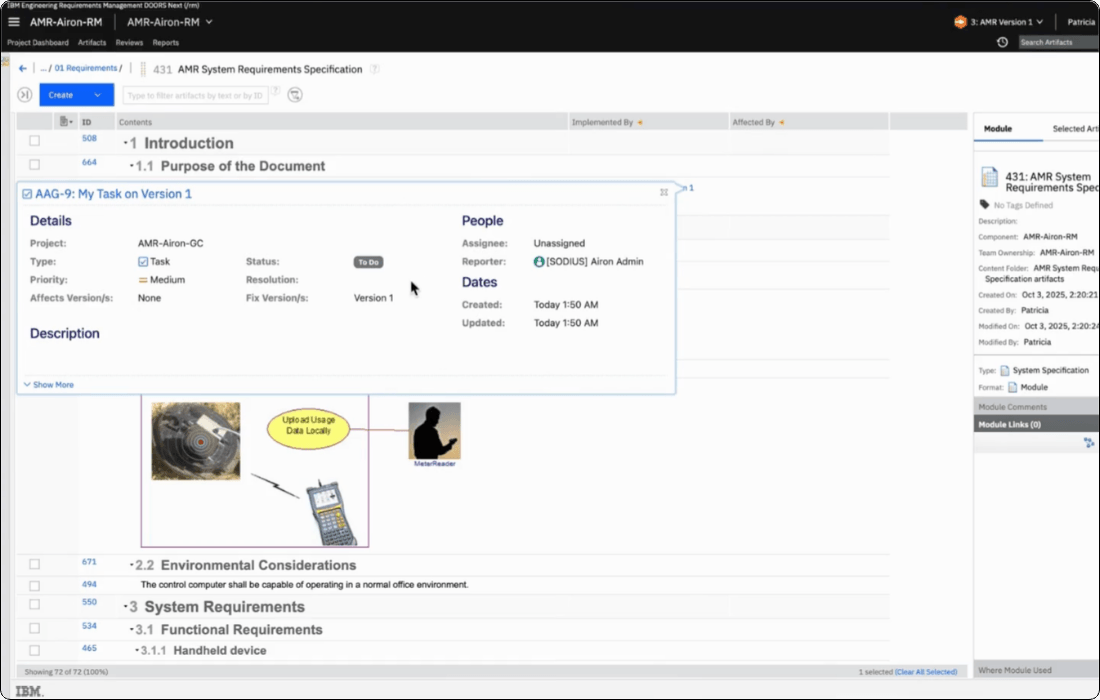
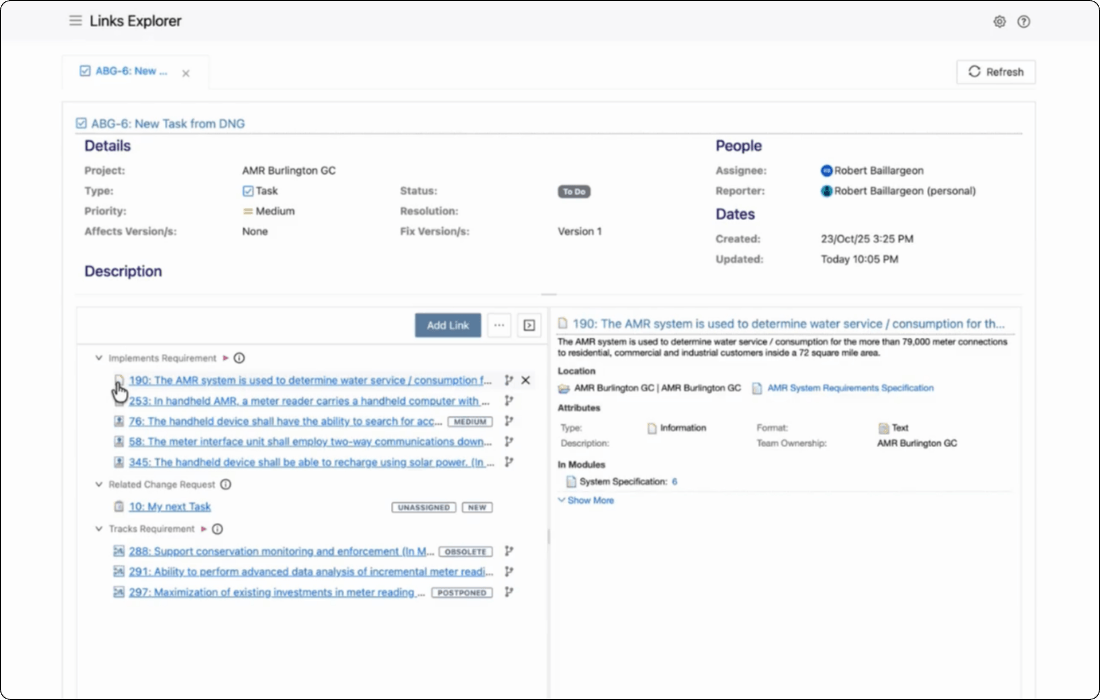
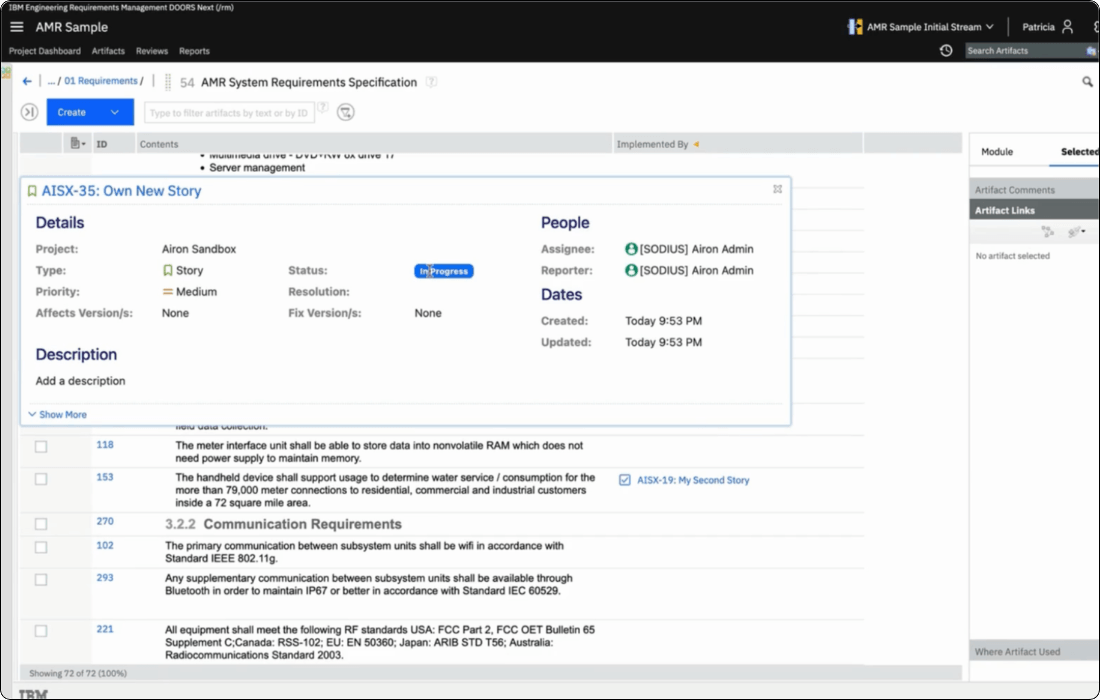
Once a link exists, Jira users can hover over it to see a live preview of the requirement without leaving Jira.
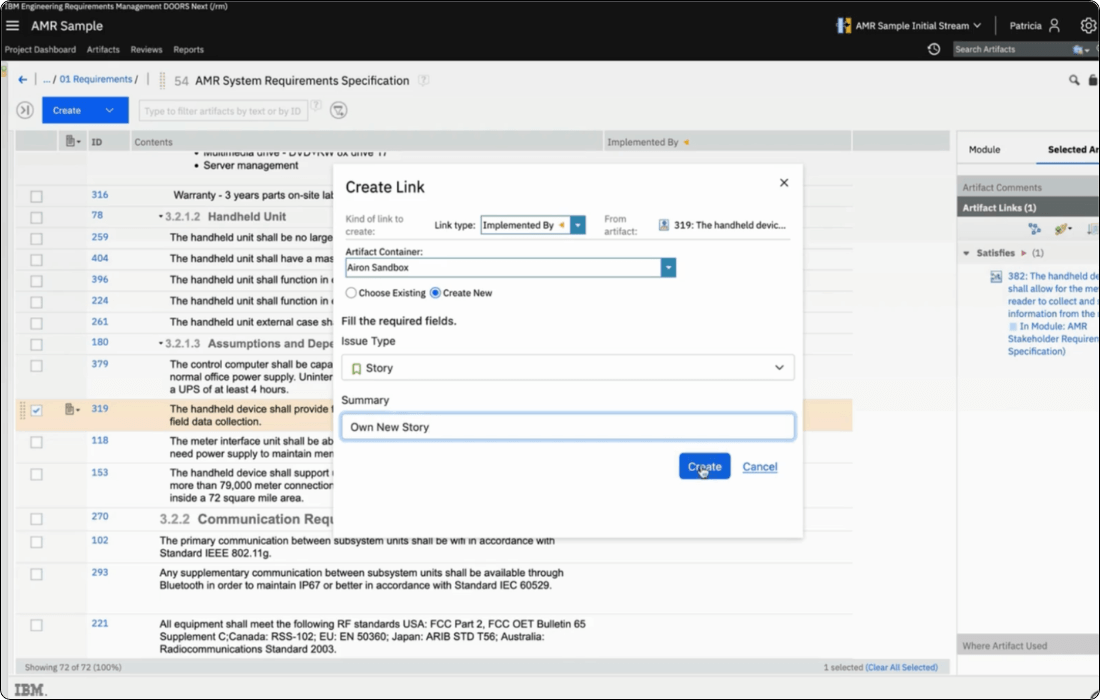
Systems engineers working in DOORS Next can create new Jira issues directly from a requirement's, without switching to Jira.
OSLC Connect for Jira opens a native Jira creation form, pre-populated with the requirement's details, and sets the correct Jira issue type automatically based on your administrator's mapping (for example, a DOORS Next functional requirement creates a Jira Story; a DOORS Next defect creates a Jira Bug).
The new issue is created, linked, and visible in Jira's backlog in one action. Traceability is established from the moment the story exists.
When a link exists between a Jira issue and a DOORS Next requirement, engineers in both tools can see a live preview of the linked artifact without navigating away from their current tool.
In Jira, developers can over an OSLC link and see the requirement's ID, title, status, and priority. Information is pulled live from DOORS Next. In DOORS Next, systems engineers can hover over a linked Jira issue and see its assignee, status, sprint, and story points.
Preview content is configurable per artifact type, and all previews respect the native access controls of both tools.
When requirements change in DOORS Next, those changes must go through a controlled changeset before they're delivered back to the stream.
OSLC Connect for Jira brings the approval workflow into Jira: link a changeset to a Jira task, run the review cycle in Jira, and when the task reaches the configured approved state, DOORS Next allows delivery.
Reviewers can see exactly which requirements changed directly from the Jira issue. The result is a permanent, auditable approval record managed entirely within your existing Jira workflow.
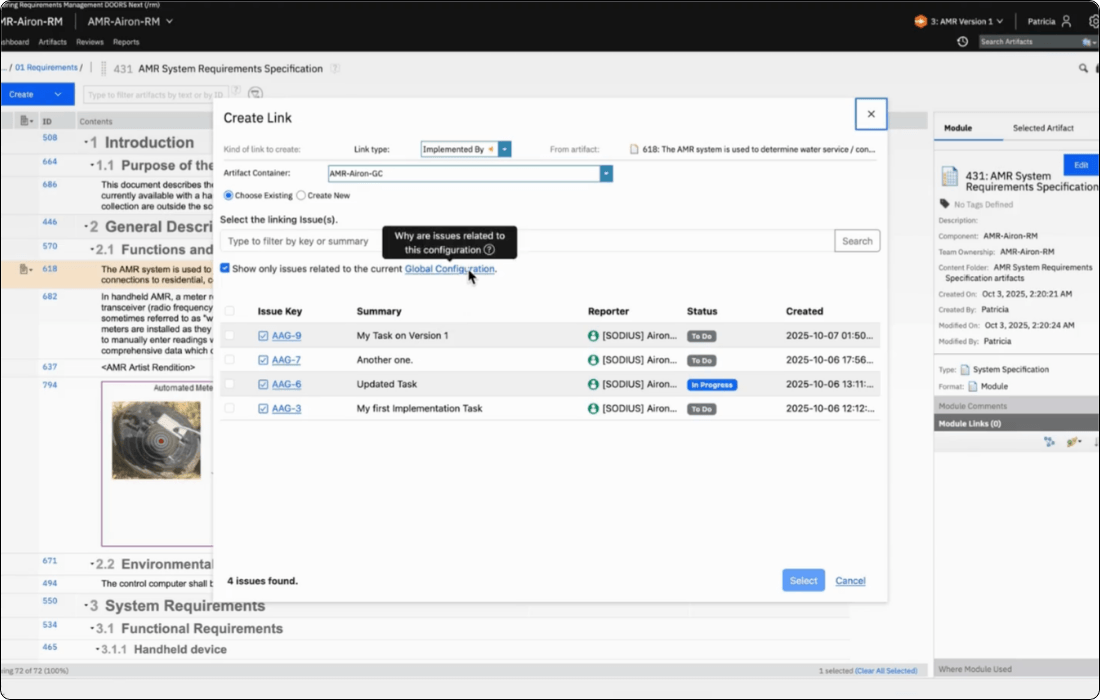
For programs managing product variants, development streams, or formal design review baselines, OSLC Connect for Jira supports IBM Global Configurations natively.
Map Jira fix versions to OSLC Global Configurations, and requirement links resolve against the correct baseline automatically when a user switches context. A developer on a sprint baseline sees the requirements they committed to implement. A reviewer at PDR sees the versions that were current at PDR, not the latest working state. Configuration context is always visible in Jira, with warnings when links cross configuration boundaries.
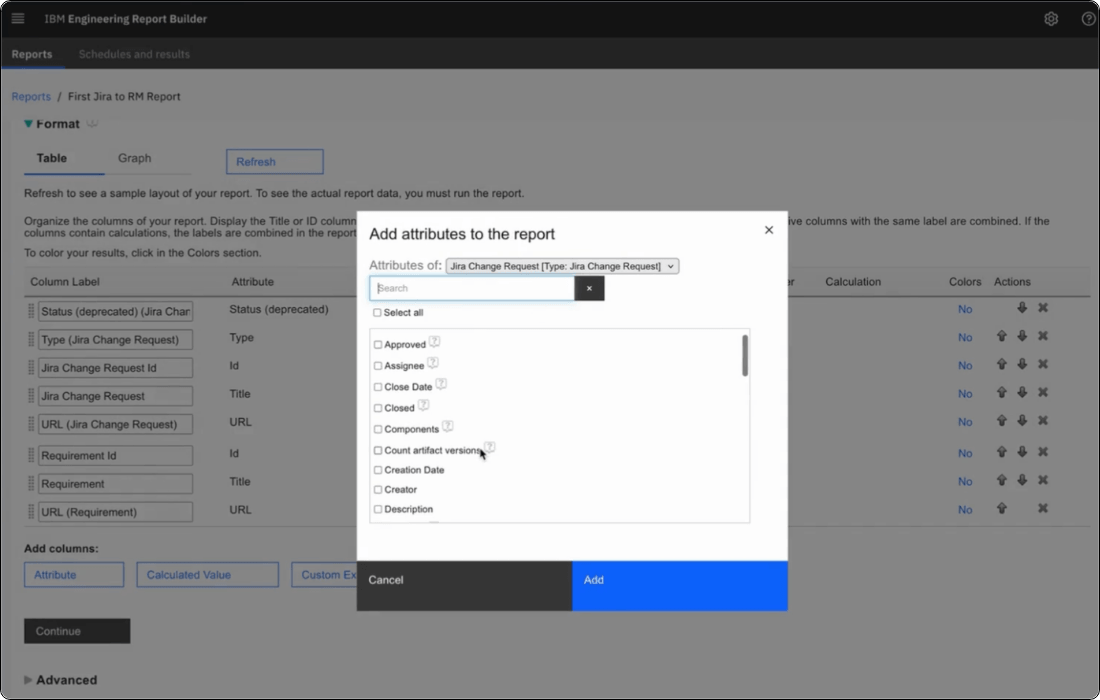
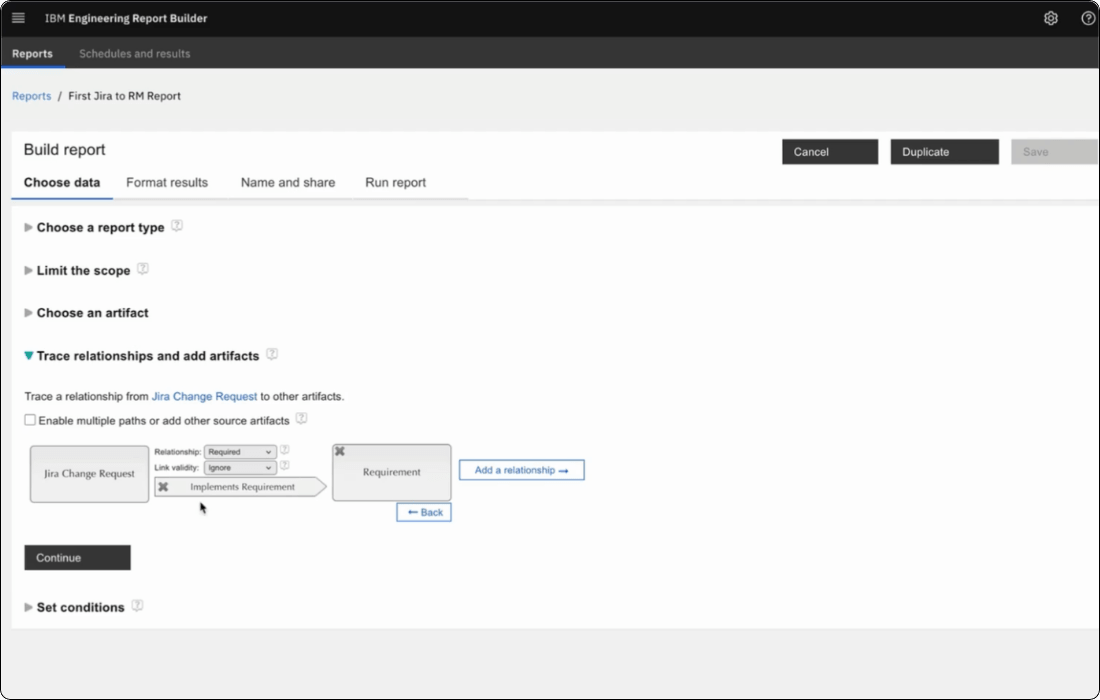
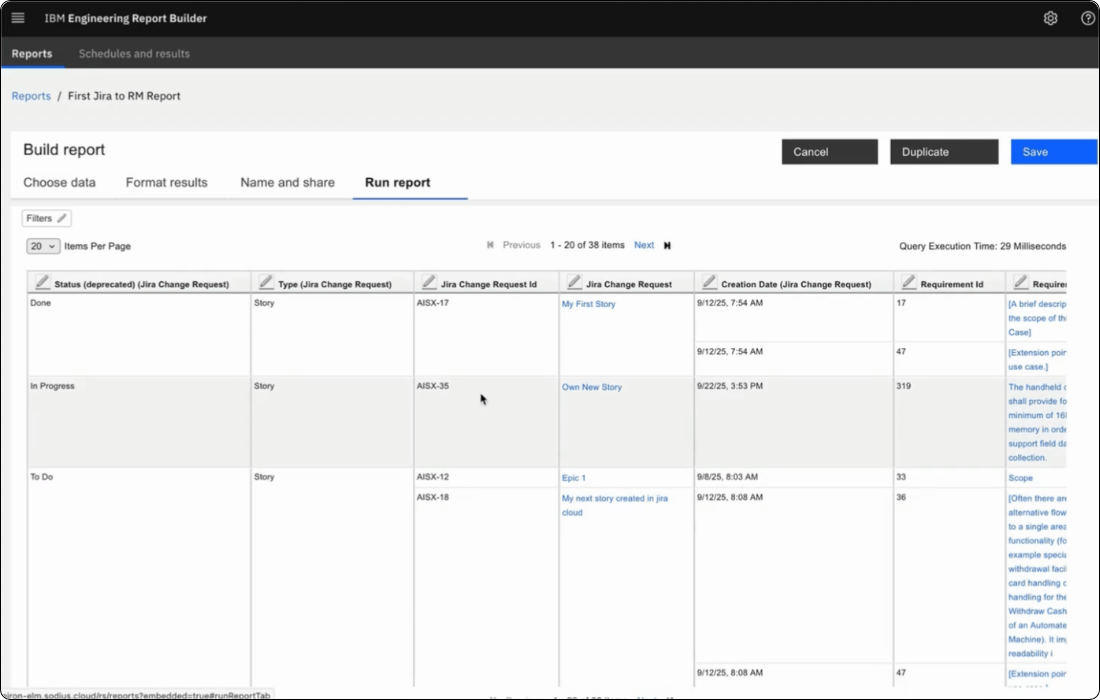
OSLC Connect for Jira exposes Jira artifacts and their attributes directly into IBM Report Builder and the Lifecycle Query Engine (LQE).
Engineering managers can build cross-tool reports showing the complete traceability chain from DOORS Next requirement to Jira story (with live status) to test case to test result, with no manual data extraction. For ISO 26262, ASPICE, and DO-178C, this means audit evidence that's always current, always available, and never assembled by hand before a review.
Teams in automotive, aerospace and defense, and medical devices use this integration to close the traceability gap between their requirements management environment and their software development toolchain.
ISO 26262 functional safety, ASPICE process assessment, multi-variant product development with DOORS Next Global Configurations.
DO-178C software certification, ARP 4754A systems engineering, formal baseline management for SRR, PDR, and CDR.
IEC 62304 software lifecycle, complete traceability from stakeholder need through implementation and testing.
Yes. OSLC Connect for Jira can be downloaded and tried for free for 30 days directly through the Atlassian Marketplace. Click here to get the app.
Yes. Jira users can create, select, or link requirements from within Jira using native DOORS Next selection dialogs. They can also drag-and-drop DOORS items or paste URLs to create OSLC links. Administrators can restrict which link types or actions are allowed to enforce organizational process rules.
Yes. OSLC Connect for Jira supports IBM Global Configurations natively. Jira fix versions or releases can be mapped to OSLC Global Configurations, so links resolve against the correct requirement baseline for each configuration context. This is essential for programs managing product variants, parallel development streams, or formal design review baselines. See the Global Configurations feature section above for more detail.
Yes. The integration exposes Jira artifacts and their attributes into IBM’s reporting infrastructure (LQE, Report Builder). Teams can build cross-tool reports showing requirement coverage, implementation progress, defect impact, change sets, and more, supporting compliance, analytics, and decision-making.
SodiusWillert will soon be releasing OSLC Connect for Jira Cloud, designed with a cloud-native approach while preserving OSLC principles. It introduces a Links Explorer interface that simplifies link visualization and creation on Jira Cloud, maintaining connection with DOORS Next and IBM ELM tools. General availability is expected January 2026. You can sign up to our email notification list to be notified of its release here.
Support includes standard SodiusWillert enterprise support: assistance with configuration, troubleshooting, onboarding guidance, and best practices for OSLC across your IBM ELM and Jira environments. As with all SodiusWillert enterprise integrations, the solution is designed to meet expectations for scalability, performance, security, and IT supportability.
During your evaluation, you can contact the SodiusWillert support team for technical questions, setup guidance, and best practices. You can access our Support portal here.
Pricing is based on Jira user tiers and is available directly on the Atlassian Marketplace listing. Use the pricing calculator on this page for an estimate, or contact us for a quote.
Pricing calculator
Use our calculator to configure a cost estimate that fits your unique business needs.
OSLC Connect for Jira pricing estimate
Our app is sold as an annual subscription. You are eligible for support and automatic version updates as long as your subscription is active.
Your estimate:
OSLC Connect for Jira pricing estimate
Cloud, annual subscription
$- USD / year
for - Jira users
TRS/GC option for IBM ELM
Cloud, annual subscription
$- USD / year
for - Jira users
Total estimated cost:
$- USD / year
for - Jira users
Explore our resources to help you connect Jira Software to IBM Engineering Requirements Management DOORS Next.
Download OSLC Connect for Jira from the Atlassian Marketplace and try the integration free for 30 days.
Watch a recorded live demo of the full DOORS Next–Jira integration: bi-directional linking, Global Configurations, change approval workflows, and IBM Report Builder with Jira data.
Need help with OSLC Connect for Jira configuration or troubleshooting? Contact the SodiusWillert support team.
Eliminate the traceability gap between your systems engineers and software teams. OSLC Connect for Jira connects IBM DOORS Next and Jira Software with live, standards-based links.
Sodius SAS
34 Boulevard du Maréchal A. Juin
44100 Nantes, France
Sodius Corp
14362 N Frank Lloyd Wright Blvd
Suite 1000
Scottsdale, AZ 85260, USA
Willert Software Tools GmbH
Hannoversche Str. 21,
31675 Bückeburg, Germany
With a unified vision, Sodius and Willert together execute on their mission to enable the thread of engineering through enterprise integration of engineering data. Both companies bring a unique yet complementary background of technology, expertise, and experience into a centralized brand to connect the engineering information that drives today’s complex and regulated products.
UNITED STATES
418 N. Main Street 2nd Floor/Suite 200,
Royal Oak, MI 48067, USA
+1 (248) 270-2950
FRANCE
Sodius SAS
34 Boulevard du Maréchal A. Juin
44100 Nantes, France
+33 (0)2 28 23 60 60
GERMANY
Willert Software Tools GmbH
Hannoversche Str. 21,
31675 Bückeburg, Germany
+49 5722 - 9678 60