












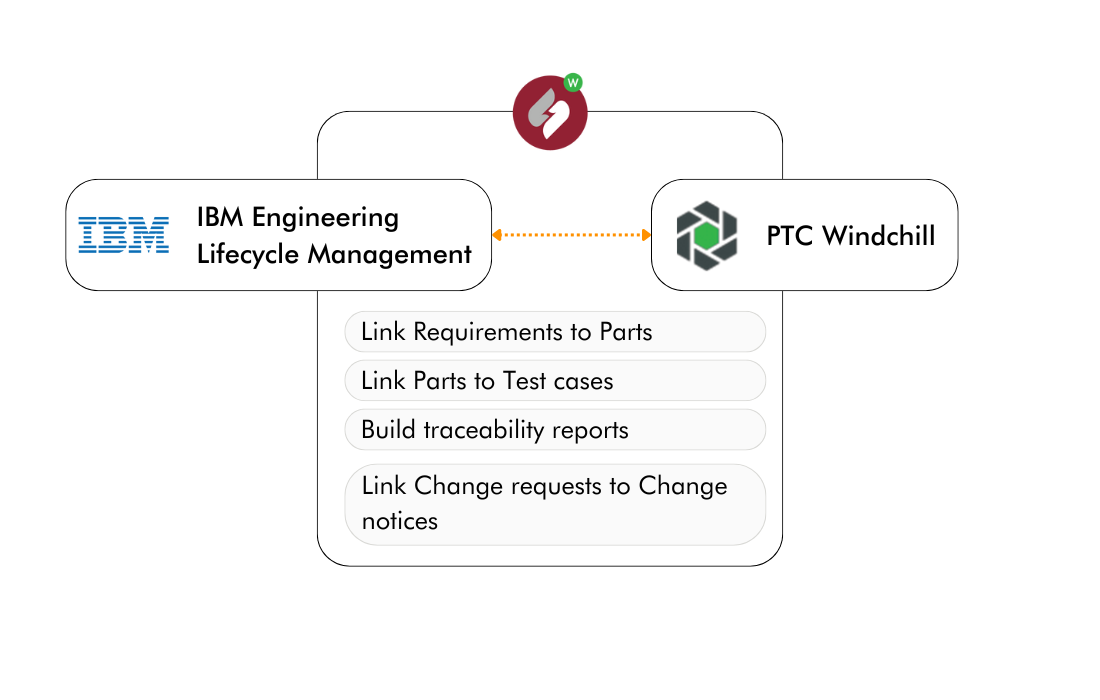
Connect PTC Windchill to IBM Engineering Lifecycle Management

Establish live bidirectional traceability between your PLM and IBM ELM toolchain: linking parts, requirements, tests, and change management without duplicating a single record.

PTC Windchill + IBM ELM
INTEGRATION OVERVIEW

What is OSLC Connect for PTC Windchill?

OSLC Connect for PTC Windchill is a server-side integration that bridges PTC Windchill with IBM Engineering Lifecycle Management, including IBM DOORS Next, IBM Engineering Workflow Management, and IBM Engineering Test Management. Built on the open OSLC standard, it creates live, authenticated links between engineering artifacts across your PLM and ALM systems, so mechanical, systems, and software teams always work from the same current data.

oslc-logo
OSLC-Standard, Deep Integration

Embedded directly into the Windchill UI, no separate middleware or adapter layer. Feels native to both tools.

Bidirectionality-icon-SodiusWillert-100x100px-color
Live, Bidirectional Traceability

Link Windchill parts, change requests, and change notices to DOORS Next requirements, test cases, and work items in both directions, in real time.

Safety-icon_SodiusWillert_100x100px_color
Enterprise-Grade Security

Data is linked, never copied. Access to any artifact requires authentication in its source system — supports the audit and control requirements of aerospace, defense, and automotive organizations.

KEY CAPABILITIES

What you can do with our PTC Windchill + IBM ELM connector

Whether you are a systems engineer tracing parts to standards, a test manager validating change requests, or an IT architect enforcing configuration management, OSLC Connect for Windchill handles the integration work, so your teams can focus on engineering.

Link Windchill Parts to IBM DOORS Next Requirements

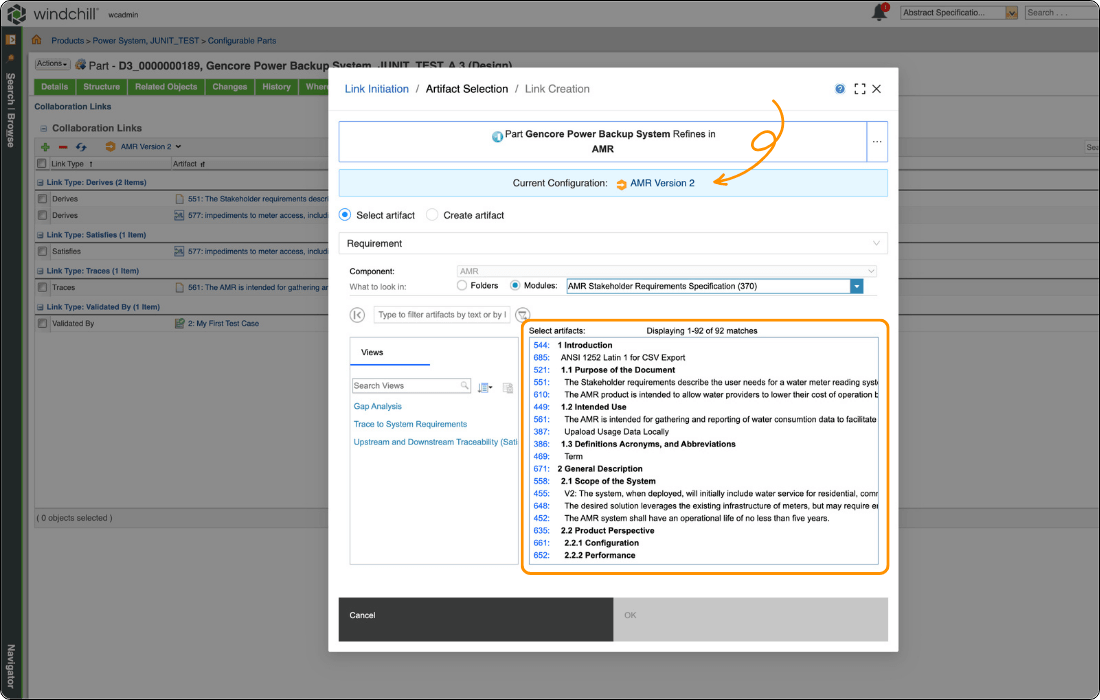
Associate Windchill parts with the regulations, customer requirements, or internal standards they must satisfy, directly inside the Windchill interface. Use IBM Global Configuration Management to track which version of a requirement a specific part iteration was designed against, supporting long-term reuse and compliance audits in regulated programs.

Trace Change Requests across Windchill and IBM ELM

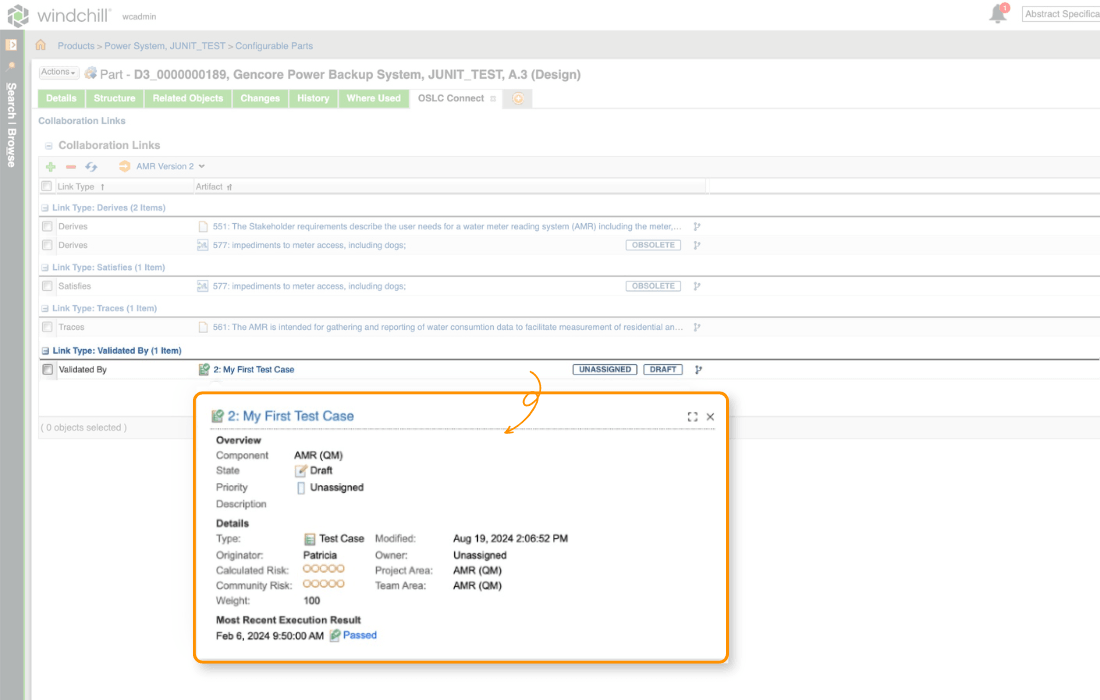
Connect Windchill change requests and change notices to related work items in IBM Engineering Workflow Management. Safety assessments, software change requests, and interface analyses in your RTC or JIRA environment are visible in context, directly from the Windchill change object. Teams stay synchronized without status meetings.

Report across the enterprise in IBM Report Builder

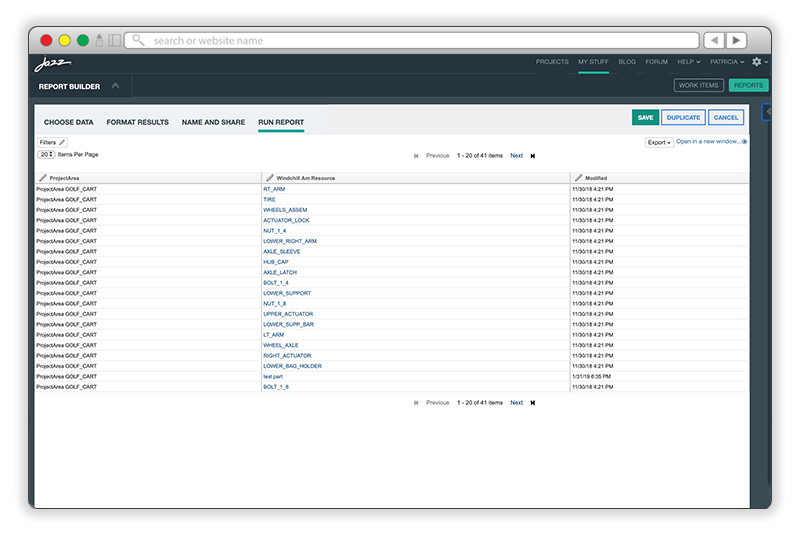
TRS (Tracked Resource Set) feeds expose Windchill parts, change requests, and change notices to IBM Report Builder and other TRS-compliant reporting tools. Build a single report that combines PLM and ALM data including traceability completeness, change status, and test coverage, across your entire engineering organization.

HOW IT WORKS

Three Steps to a Connected Windchill–IBM ELM Environment

The integration is deployed server-side as a Windchill extension, no agents, no middleware, no coding required.

Install the Windchill Extension

OSLC Connect for Windchill is deployed as a collection of Java JARs directly into your PTC Windchill environment. The connector acts as both an OSLC provider byexposing Windchill data to IBM ELM, and an OSLC consumer BY surfacing IBM ELM data inside Windchill. Your IT team controls deployment, updates, and access policies from day one.

Register Friend Servers in IBM ELM

Configure Windchill as a trusted friend server in your IBM ELM Jazz Team Server. This establishes the secure OAuth-based trust relationship that allows both systems to request and display each other's artifacts. Authentication remains enforced at the source. This means that no user can view data from a system they are not authorized to access.

Create and Navigate Links in Context

Engineers open a Windchill part or change request and use the OSLC Links tab to search, select, and link artifacts from IBM DOORS Next, IBM ETM, or IBM EWM. Links are stored within Windchill. Rich hover previews and direct navigation between tools are available immediately, with live data pulled at the moment of access.

WHY CHOOSE OSLC CONNECT FOR PTC WINDCHILL

Built for Engineering Teams in Regulated Industries

SodiusWillert has spent over two decades enabling enterprise integration for aerospace, defense, and automotive programs. OSLC Connect for PTC Windchill reflects that experience. It is built to meet the operational and compliance demands of large engineering organizations.

Check mark_color_59x59px
End-to-End Traceability Without Data Migration

Artifacts stay in their authoritative source system. OSLC Connect creates live references so your requirements in DOORS Next and your parts in Windchill always reflect the truth as it exists today, with no synchronization lag or conflict resolution overhead.

Check mark_color_59x59px
Real-Time Visibility Across Engineering Silos

Test results, change request statuses, and requirement updates are visible in context the moment they happen. Product teams no longer need a meeting to learn that a test passed or a work item was closed because that information surfaces inside Windchill automatically.

Check mark_color_59x59px
Deployed and Managed by Your IT Team

The server-side architecture means the integration runs within your existing infrastructure, behind your firewall, under your access policies. There are no cloud dependencies for the core linking functionality, and deployment follows your standard Windchill customization process.

Check mark_color_59x59px
Supports Compliance and Safety Certification Workflows

For programs operating under DO-178C, ISO 26262, ARP4754A, or similar standards, demonstrating complete requirements traceability is not optional. OSLC Connect for Windchill creates the documented, versioned traceability chain from customer requirement to manufactured part that auditors and certification bodies require.

Check mark_color_59x59px
Connects to the Full IBM ELM Suite and Beyond

A single connector gives you access to DOORS Next, Engineering Workflow Management, Engineering Test Management, and IBM Report Builder... And because the integration is based on the OSLC open standard, it also extends to other OSLC-compliant tools such as OSLC Connect for Jira, giving you a common integration backbone across the enterprise.

SUPPORT AND RESOURCES

Everything you need to get up and running

Explore all our resources to learn how to connect PTC Windchill and IBM Engineering Lifecycle Management with OSLC Connect.

FREQUENTLY ASKED QUESTIONS

OSLC Connect for Windchill + IBM ELM Integration FAQ

What IBM ELM tools does OSLC Connect for PTC Windchill support?

OSLC Connect for Windchill integrates with the full IBM Engineering Lifecycle Management suite: IBM Engineering Requirements Management DOORS Next (requirements traceability), IBM Engineering Workflow Management (change and work item management), IBM Engineering Test Management (test plans, test cases, and test results), and IBM Report Builder and RELM (cross-tool reporting via TRS feeds). The integration is based on the open OSLC standard, so it also works with other OSLC-compliant tools in your environment.

Does the integration copy or synchronize data between Windchill and IBM ELM?

No. OSLC Connect for Windchill is a linked-data integration, not a synchronization solution. Artifacts remain in their authoritative source system at all times. When an engineer in Windchill views a linked DOORS Next requirement, the connector retrieves that information live from IBM ELM at the moment of access, authenticated as that user. Nothing is duplicated, and there is no synchronization job to schedule or monitor. This means your data is always current and there is one single version of the truth across both systems.

How does security and access control work across the two systems?

Access is enforced by the source system at the moment of every data request. A Windchill user who clicks on a linked IBM DOORS Next requirement must be authenticated in DOORS Next before the rich preview or navigation is available, their Windchill session does not grant them IBM ELM access, and vice versa. This architecture ensures that your existing access control policies, audit trails, and security configurations in both systems remain fully in force, with no data visible to users who are not authorized in the originating tool.

What license types are available, and can we evaluate the connector before purchasing?

OSLC Connect for Windchill is available under a commercial perpetual license or an annual subscription, depending on your organization's preference. License sizing is typically based on the number of Windchill users who will interact with OSLC links. SodiusWillert offers a free trial evaluation period so your engineering and IT teams can validate the integration against your real Windchill and IBM ELM environments before making a purchase decision. Contact our sales team at sodiuswillert.com/contact to request a trial license.

Ready to Connect PTC Windchill to IBM ELM?

Contact us to get a free trial license and see how OSLC Connect for Windchill integrates into your environment.

Fichier 1 1 1