










Connect Jira Software with Siemens Polarion ALM

Connect Jira Software and Siemens Polarion ALM with live, bi-directional traceability. No data migration, no manual exports, no broken links. Purpose-built for Aerospace & Defense and Automotive teams.

Available for Jira Cloud and Data Center.

preview-Jira-data-in-Polarion
INTEGRATION OVERVIEW

About the Jira + SIEMENS Polarion ALM integration

OSLC Connect for Jira is a SodiusWillert integration that creates live, bi-directional links between Jira issues and artifacts in Siemens Polarion ALM: requirements, test cases, and work items alike.

It is available for both Jira Cloud and Jira Data Center. It uses the OSLC (Open Services for Lifecycle Collaboration) open standard, so your data stays where it belongs, in each tool, and is always current at the point of use. No duplication. No synchronization jobs. No one-way bridges.

oslc-logo
OSLC Standard-Based

OSLC Connect for Jira connects tools over an open, vendor-neutral standard. It is not a proprietary bridge that locks you in or breaks with Polarion upgrades.

Monitoring-icon_SodiusWillert_100x100px_color
Jira-Native Experience

Polarion requirements appear as standard Jira issue links, with rich hover previews and live status updates, without users having to leave  Jira.

Safety-icon_SodiusWillert_100x100px_color
Compliance-Ready

Live Jira data flows into Polarion reports, giving you a complete, auditable traceability record for ISO 26262, ASPICE, and DO-178C audits.

KEY CAPABILITIES

Jira Software and Polarion ALM Integration Features

 Whether you manage requirements in Polarion and track development in Jira, or need to surface Jira sprint progress inside a Polarion compliance report, these capabilities give your teams the Jira Polarion connector they actually need in production.

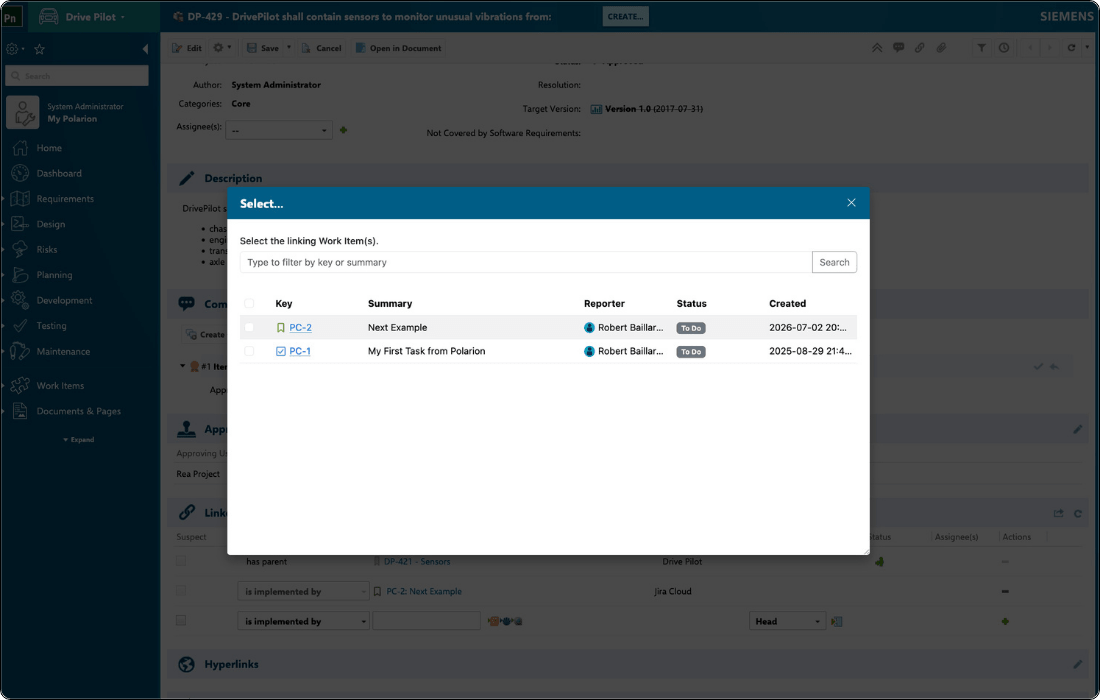
Link to existing Jira issues from within Siemens Polarion

From any Polarion artifact (e.g. requirements, tests), open the OSLC selection dialog to search and filter Jira issues by project or type, then select one or several to link.

OSLC Connect for Jira will set the correct Jira issue type automatically based on your administrator's mapping (for example, a Polarion functional requirement creates a Jira Story; a Polarion defect creates a Jira Bug). The relationship (e.g. "implemented by") is established in both systems simultaneously, with no need to open Jira to confirm it.

Traceability is established at the source, without switching tools or maintaining it in two places.

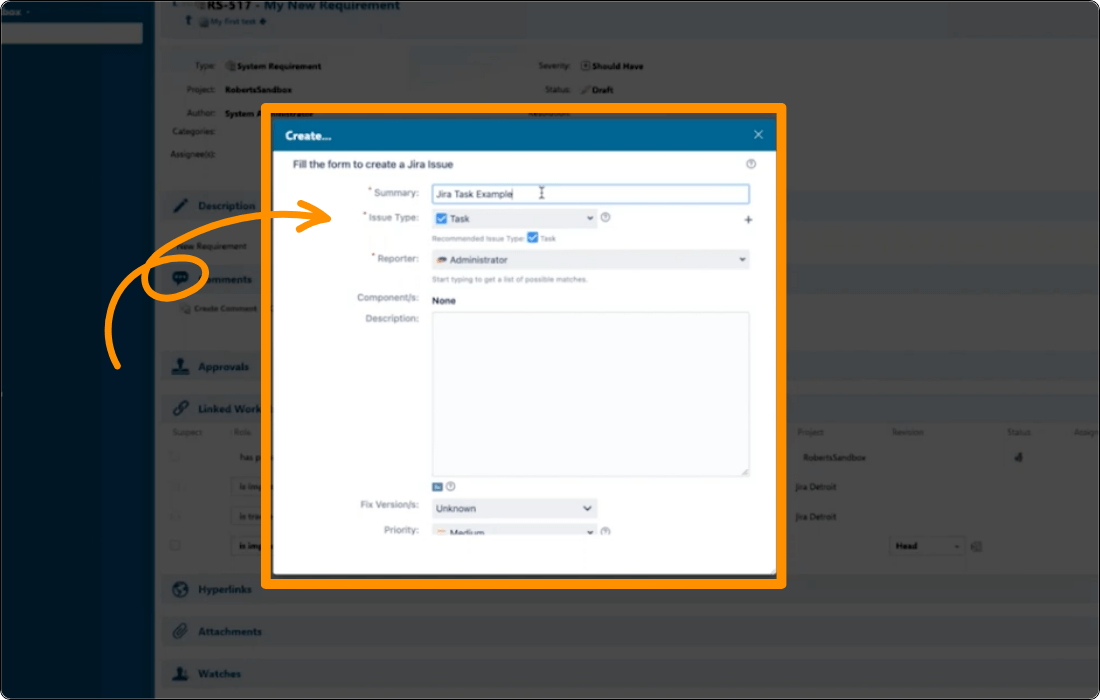
Create Jira issues from Polarion REQUIREMENTS

If no Jira issue exists yet for a requirement, teams in Polarion ALM can create one from within Polarion REQUIREMENTS or QA without leaving the tool.

The new issue appears immediately in Jira and is linked back to the originating Polarion ALM artifact automatically.

Preview live Jira data in Siemens Polarion REQUIREMENTS

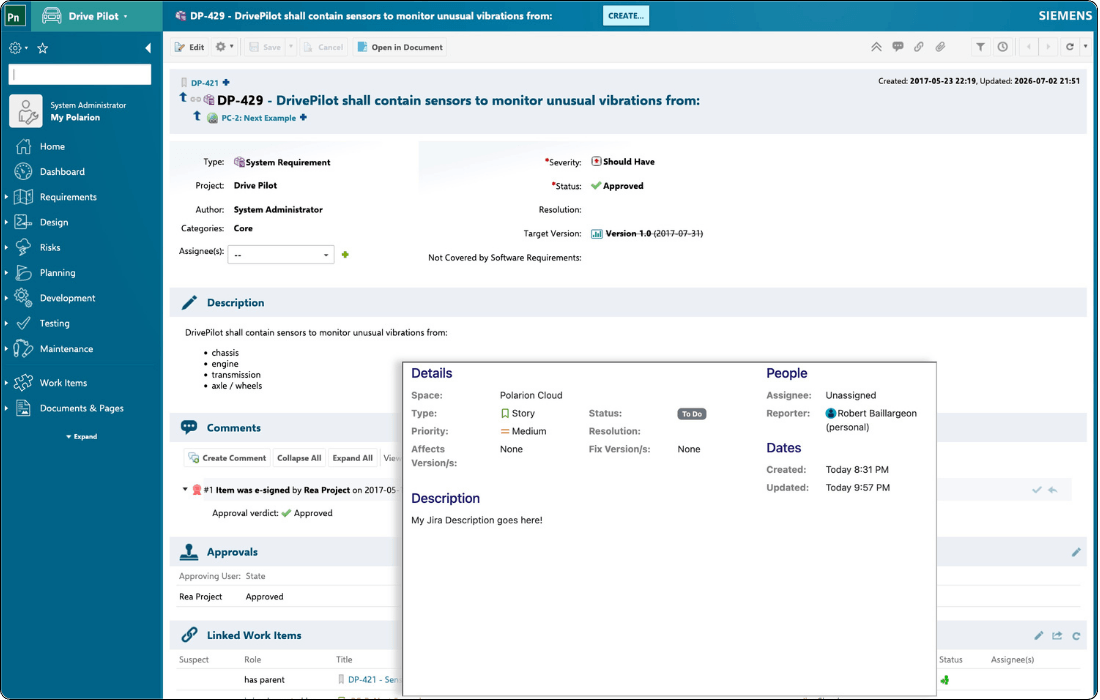
In Polarion Requirement, systems engineers can rich hover over a linked Jira issue and see its assignee, status, sprint, description, and other attributes that are pulled live from Jira Cloud at the moment of viewing. No need to switch tools, and no stale snapshot.

Preview content is configurable per artifact type, and all previews respect the native access controls of both tools.

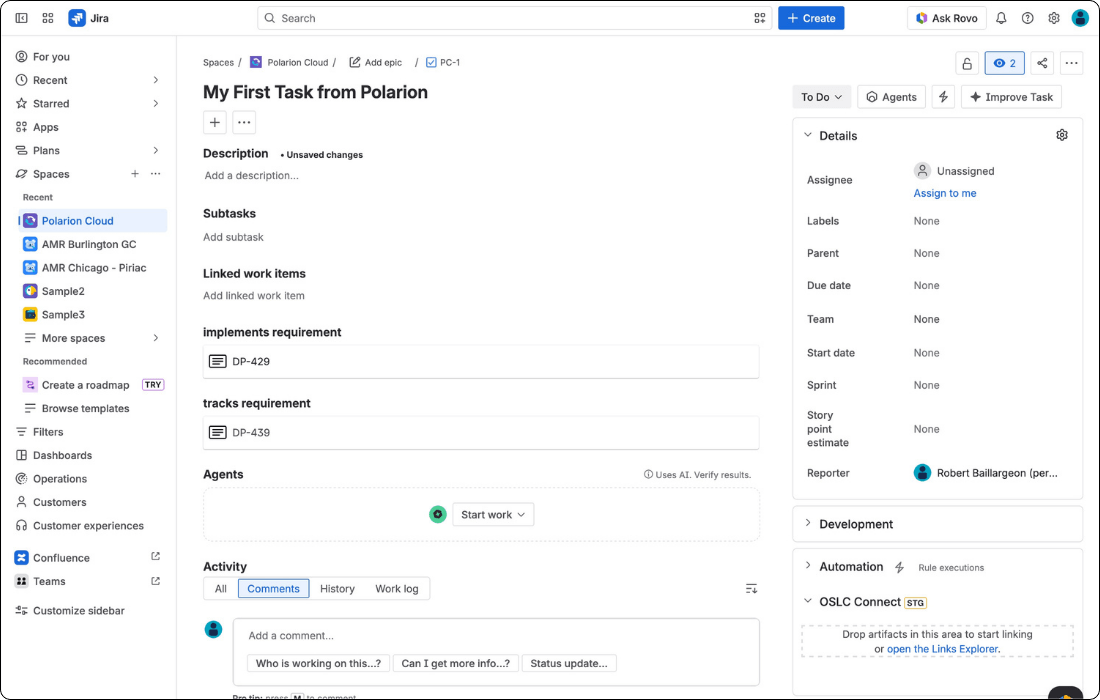
See OSLC Links inline on any Jira issue

Jira issues display their linked Polarion  requirements directly on the issue, with type and status decorators at a glance.

Delivery teams see what they need without engaging artifacts they don't own.

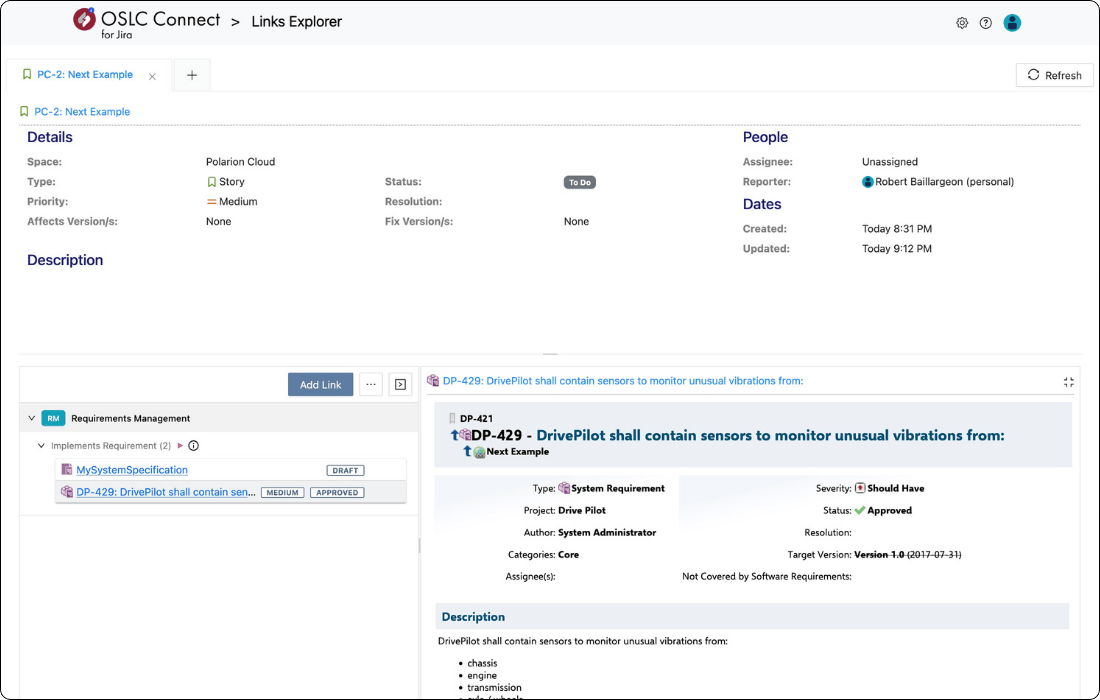
Manage Links in the Links Explorer

The Link Explorer gives Jira users a dedicated space to engage with OSLC links.

View, sort, filter by domain (requirements, test, change), open rich previews of linked artifacts, create new links via dialog or by dragging a Polarion artifact directly onto the explorer, and navigate to the linked item in its source tool.

Delivery teams get full link management without needing access to or training on Polarion applications. The link creation and review can happen inside the Jira interface they already use every day.

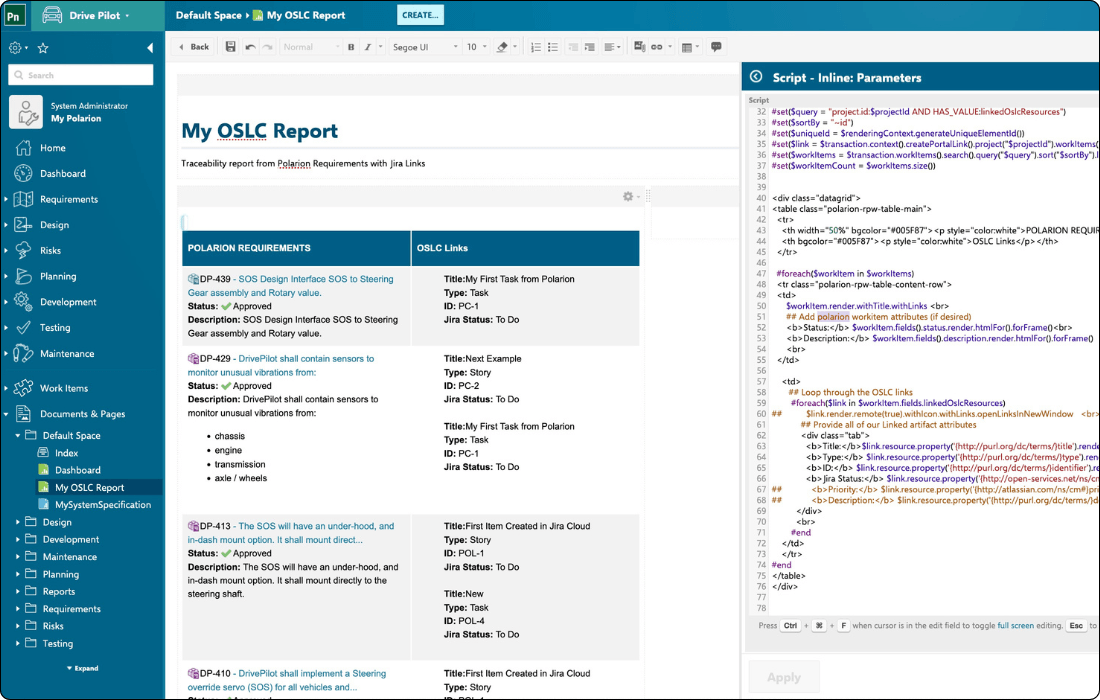
Jira data in Siemens Polarion reports

Add Jira data to your reports in Siemens Polarion ALM, providing you with a centralized overview of the trace relationships between your requirements and implementation tasks.

Engineering managers can build cross-tool reports showing the complete traceability chain from Polarion requirement to Jira story (with live status) to test case to test result, with no manual data extraction. For ISO 26262, ASPICE, and DO-178C, this means audit evidence that's always current, always available, and never assembled by hand before a review.

HOW IT WORKS

A Jira + Polarion ALM integration up and running in three steps

OSLC Connect for Jira makes it easy to seamlessly integrate Jira Software with SIEMENS Polaron ALM. See how you can get set up and started in minutes.

Install and connect

Install OSLC Connect for Jira from the Atlassian Marketplace (Data Center) or via SodiusWillert for Cloud. Then establish a "Friend" relationship between Jira and your external engineering tool such as Polarion. This authorizes cross-tool communication using OAuth, delegating authentication to each tool's native identity system. There is no new user directory to manage.

Create and navigate links

Users create OSLC links directly from Jira or from Siemens Polarion REQUIREMENTS. The linking dialog embeds the native Polarion artifact picker inside Jira, so engineers search and select requirements, test cases, or work items without leaving their workflow. Links are typed by OSLC relationship role and bi-directional from the moment they are created.

Report on the full traceability chain

Jira artifacts flow into IBM Report Builder through a TRS feed. Build reports that trace requirement to implementation to test to defect, in one place, without a manual export.

BENEFITS

Why teams choose OSLC Connect for Jira to connect Jira and Siemens Polarion

The right Jira Polarion connector does more than move data. It enforces process, supports compliance, and fits into your engineers' existing workflows without learning a new toolchain.


Check mark_color_59x59px
No data migration or duplication

Data stays in its source tool. OSLC Connect for Jira creates live links over the OSLC standard. Jira stores the URL, Polarion stores the URL, and everything you see is pulled dynamically from the remote system. Nothing is copied. Nothing can go stale due to a failed sync.

Check mark_color_59x59px
Audit-ready compliance traceability

Jira issue data such as status, priority, story points, sprint, assignee, is available inside Polarion reports via OSLC. Compliance teams can generate complete lifecycle reports that include live development data from Jira, satisfying ISO 26262, DO-178C, and ASPICE traceability requirements.

Check mark_color_59x59px
Process enforcement in Jira

Workflow validators use live Polarion data to enforce your process rules at the point of action. Teams cannot transition a Jira ticket until the requirements it implements are in an approved state in Polarion.

Check mark_color_59x59px
Open standard, long-term interoperability

OSLC is an OASIS open standard used by IBM, Siemens, and other leading ALM vendors. Choosing an OSLC-based Jira Polarion connector means your integration is not tied to a proprietary sync engine that can break between Polarion versions or Jira Data Center upgrades.

Check mark_color_59x59px
Engineers stay in their tool of choice

Developers work in Jira. Requirements and systems engineers work in Polarion. Both see live cross-tool data in context via rich hover previews, link status, and dynamic tables, without switching applications or accessing the other tool directly.

Resources

Explore our resources to help you connect Jira Software to Siemens Polarion ALM.

FAQ

Common questions about the Jira and Polarion integration

Can we evaluate the Jira Polarion integration before purchasing?

Yes. SodiusWillert offers a free 30-day evaluation for both Jira Cloud and Jira Data Center. For Jira Data Center, request a trial license via the product page or the Atlassian Marketplace. Our team supports you through setup and validation against your Polarion environment.

For Jira Cloud, the process involves deploying the broker in your sandbox environment first; SodiusWillert then provides the 30-day evaluation key and works with your team throughout the trial. Start by requesting a Cloud trial here.


What exactly does OSLC Connect for Jira do with Siemens Polarion ALM?
OSLC Connect for Jira creates live, bi-directional traceability links between Jira issues and artifacts in Siemens Polarion ALM such as requirements, test cases, change requests, or any work item type your Polarion configuration supports. Links are created from within either tool. Neither side needs to export or import data. The connection is live: status updates in Polarion appear in Jira in real time, and Jira data is available in Polarion reports without any extract-transform-load (ETL) step.
What licensing model does OSLC Connect for Jira use?

Both the Jira Cloud and Jira Data Center editions are available on an annual subscription basis through the Atlassian Marketplace and directly from SodiusWillert. The Data Center edition is priced on your Jira user tier. The Cloud edition follows a similar model. Contact our team for current Cloud pricing, as it reflects the additional infrastructure component (broker) required for that deployment.

For volume, enterprise, or multi-product licensing (for example, combining the Jira and Confluence Polarion integrations), reach out for a tailored quote.


How is this different from the Polarion Connector for Atlassian Jira bundled with Polarion?

The bundled Polarion connector synchronizes work items between the two tools. It copies and maps data.

OSLC Connect for Jira creates live OSLC links: data is never duplicated, it is fetched dynamically from its source. This means there is no synchronization conflict to resolve, no risk of data divergence, and no scheduled sync job to maintain. It also means each tool remains the authoritative source for its own data, which is a critical distinction for regulated industries where audit trails must be unambiguous.

Does the integration support compliance requirements such as ISO 26262, ASPICE, or DO-178C?

Yes. The core value for compliance teams is that Jira issue data (e.g. status, priority, sprint, story points, custom fields) is accessible via OSLC inside Polarion reports.

This means your compliance documentation can include live Jira development data, providing end-to-end traceability from requirements through implementation and verification in a single report.

The link data is also queryable, so impact analysis across tool boundaries is possible without manual cross-referencing. OSLC Connect for Jira does not replace your quality management process; it gives your existing Polarion reporting the Jira data it needs to be complete.

Which versions of Siemens Polarion ALM and Jira are supported?

OSLC Connect for Jira is available for both Jira Cloud and Jira Data Center. The Jira Cloud edition uses a Forge app paired with a self-hosted broker; the Data Center edition installs directly as a Jira app. Both are tested against current Polarion ALM releases.

For the exact supported version matrix, refer to the release notes for Jira Cloud and Jira Data Center. If you want to confirm compatibility before starting a trial, contact our team at sodiuswillert.com/en/contact-us.

Pricing calculator

Estimate the cost of your future OSLC connector for Jira.

Use our calculator to configure a cost estimate that fits your unique business needs.

  1. 1
    Team size:
    Jira users
  2. 2
    Select your hosting platform:
  3. 3
    Do you need advanced features for Reporting and Global Configuration in IBM ELM?

OSLC Connect for Jira pricing estimate

Our app is sold as an annual subscription. You are eligible for support and automatic version updates as long as your subscription is active.

Your estimate:

  • OSLC Connect for Jira pricing estimate

    Cloud, annual subscription

    $- USD / year

    for - Jira users

  • TRS/GC option for IBM ELM

    Cloud, annual subscription

    $- USD / year

    for - Jira users

Total estimated cost:

$- USD / year

for - Jira users

Ready to connect Jira and Siemens Polarion ALM?

Eliminate tool silos and enable live, standards-based traceability across your engineering lifecycle. Don't hesitate to contact us with any questions you may have about connecting Jira Software with Siemens Polarion ALM with OSLC Connect for Jira. If you'd like to try OSLC Connect for Jira for free for 30 days, visit the Atlassian Marketplace to start your free trial!

Fichier 1 1 1
MORE POLARION INTEGRATIONS

Extend your Polarion toolchain

OSLC Connect for Jira is one part of SodiusWillert's broader Polarion integration ecosystem. If your team also uses Xray for test management or Confluence for documentation, these connectors close the remaining traceability gaps.